Every B2B sales team has faced this scenario.
Marketing is firing on all cylinders: the ads are running, the content is ranking, and demo requests are piling up. But as the top of the funnel widens, the audience gets broader. The same campaign that reaches your ideal buyer also reaches a student researching for a class project, or worse, a competitor scouting your demo flow.
And when your reps start working those leads, the story falls apart fast. Half the calendar is blocked on calls that were never going to close, and a quarter of the form fills were “just browsing”. And lost in the mix is a real buyer, waiting longer than they should for a response because your team is buried in the noise.
This is what happens when lead qualification doesn’t keep pace with lead generation. The fix lies in building a filter sharp enough to handle the volume.
Lead qualification is the process that separates the signal from the noise, i.e., the prospects who are ready, willing, and able to buy your product or service from the ones who are bound to waste your team’s time. But the way companies actually qualify leads in 2026 looks nothing like the textbook version.
This guide covers all things lead qualification: frameworks, criteria, scoring, automation, and most importantly, what real companies are doing in practice. We analyzed over 150 sales conversations to find out how teams qualify leads.
What is lead qualification?
Lead qualification is the process of evaluating whether a prospect fits your ideal customer profile and has the intent, budget, and authority to buy your product or service.
Lead qualification answers the most important question: “Should your sales team spend time on this prospect?”
Though it sounds simple, the answer requires data about the company, the person, and the timing. The goal is to filter out the wrong prospects fast enough that your sales team spends the majority of their time on prospects who have a higher chance of becoming customers.
Difference between lead vs. qualified lead
“Leads” is an umbrella term for anyone who has expressed some form of interest: either by subscribing to your newsletter, downloading a whitepaper, or booking a demo. It’s hard to determine if they’re a fit or not at this stage: it could be a VP of Operations or a college student researching for their thesis.
A qualified lead, however, is one that has passed through a set of criteria that indicate they’re worth pursuing. They have a problem that you can solve. They have the budget to buy your product or service. They have the authority to make the buying decision. And ideally, they have an urgent need.
Most B2B companies further break qualified leads into two categories:
- Marketing Qualified Leads (MQLs): These meet the baseline firmographic or behavioral criteria (right company size, engaged with content, etc.). Marketing considers them worth passing to sales.
- Sales Qualified Leads (SQLs): These are leads that your sales team have spoken with and confirmed the existence of a genuine need, budget, and timeline. These enter the pipeline as real opportunities.
Lead scoring vs. Lead qualification
Though used interchangeably, they serve different purposes:
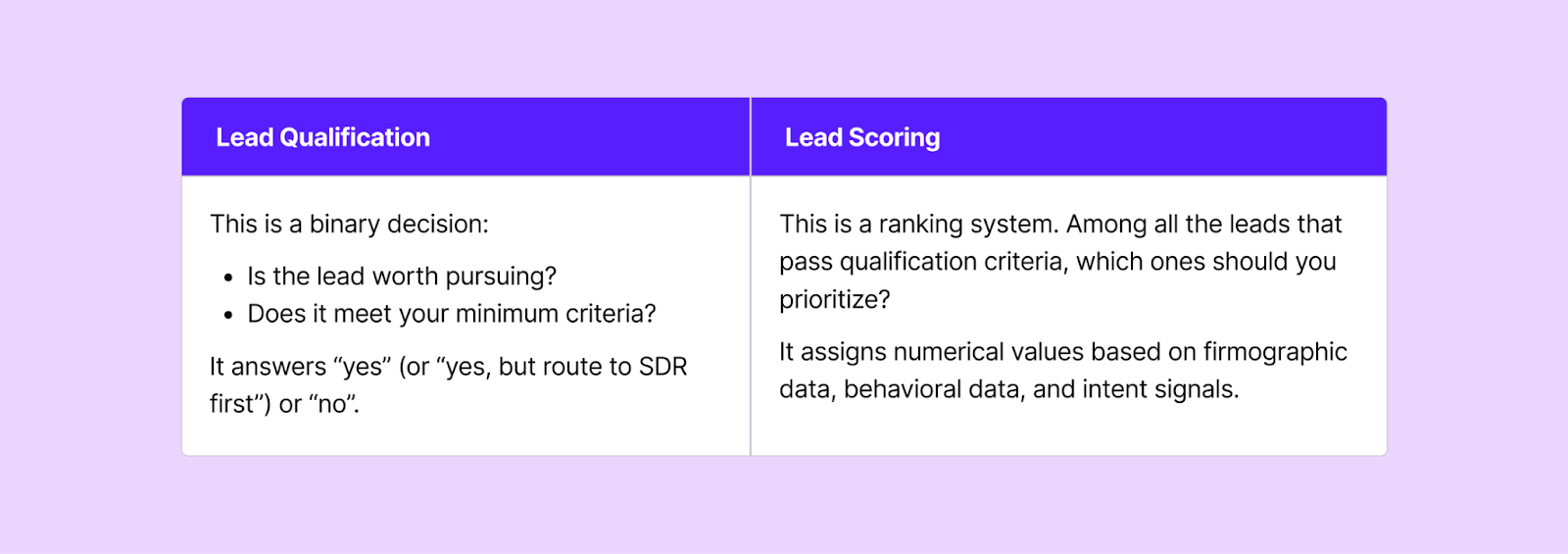
Lead qualification determines whether a lead gets a meeting, whereas lead scoring determines when and with whom.
Why lead qualification matters
The ROI for lead qualification shows up in three specific and measurable places:
- Form fill-to-booked meeting conversion rates
- Rep productivity
- Pipeline quality
We analyze inbound performance at a weekly level, and here’s what the numbers say based on 16 weeks of data:
The cost of “not qualifying”
What happens when every form submission gets a meeting?
Your reps spend 30–40% of their time on unqualified calls: every no-show, every “just browsing” prospect, every meeting with an intern who can’t make a purchasing decision. That’s a slot that could’ve gone to a real buyer.
Here’s what the data tells us:
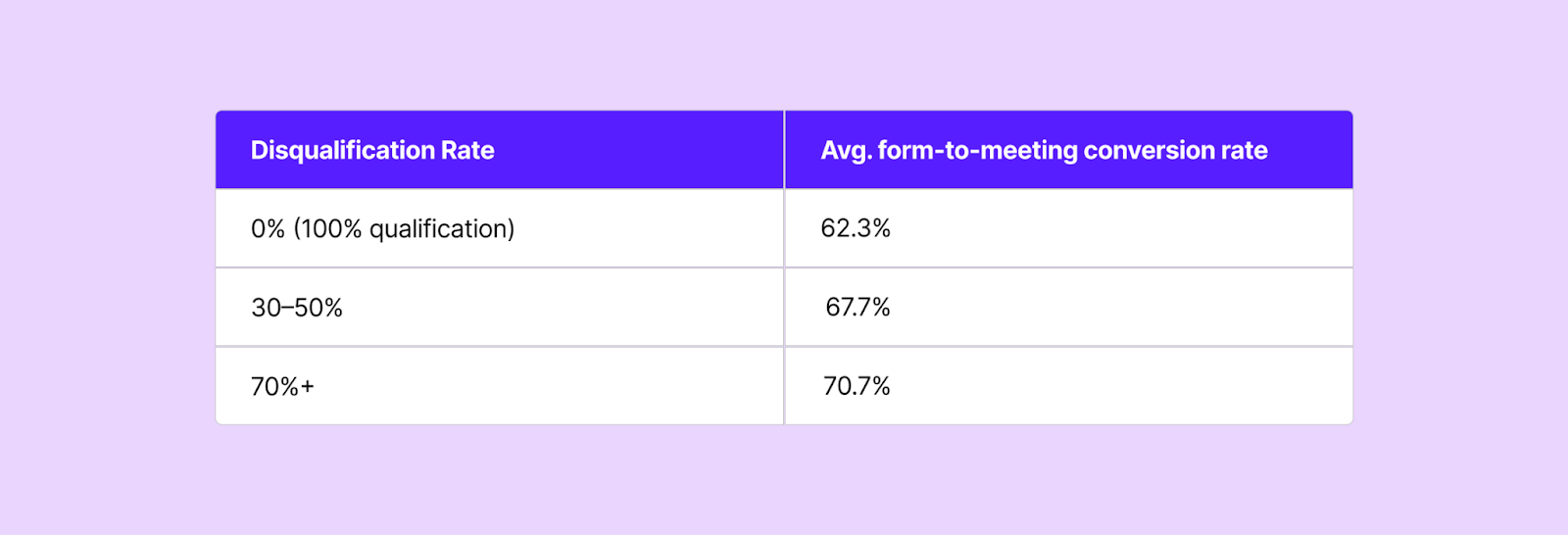
Higher disqualification rates correlate with higher meeting rates among leads that qualify.
Companies with no DQ and low meeting rates tell a cautionary tale:
- An SMB sales software company averaged 200+ form submissions per week with a 0% DQ rate. Their average meeting conversion rate was only 6.2%.
- A mid-market marketing software company averaged 350+ form submissions per week with a 0% DQ rate. They saw just a 9% meeting conversion rate on average.
Companies with aggressive DQ rates show the opposite:
- An Enterprise sales software company disqualifies 94% of their form submissions on average (500+ submissions per week), yet achieves 76.6% meeting conversion rate among the leads that pass.
- An Enterprise retail & e-commerce software company DQ’s 91% of their inbound submissions and converts 76% of those who qualify into booked meetings.
- A bootstrapped sales software company disqualifies 70% of its traffic and hits an average form-to-demo conversion rate of 84%
This leads to another question: how many of your inbound leads should be disqualified?
It depends on your company size and industry, and the data gives us clear benchmarks:
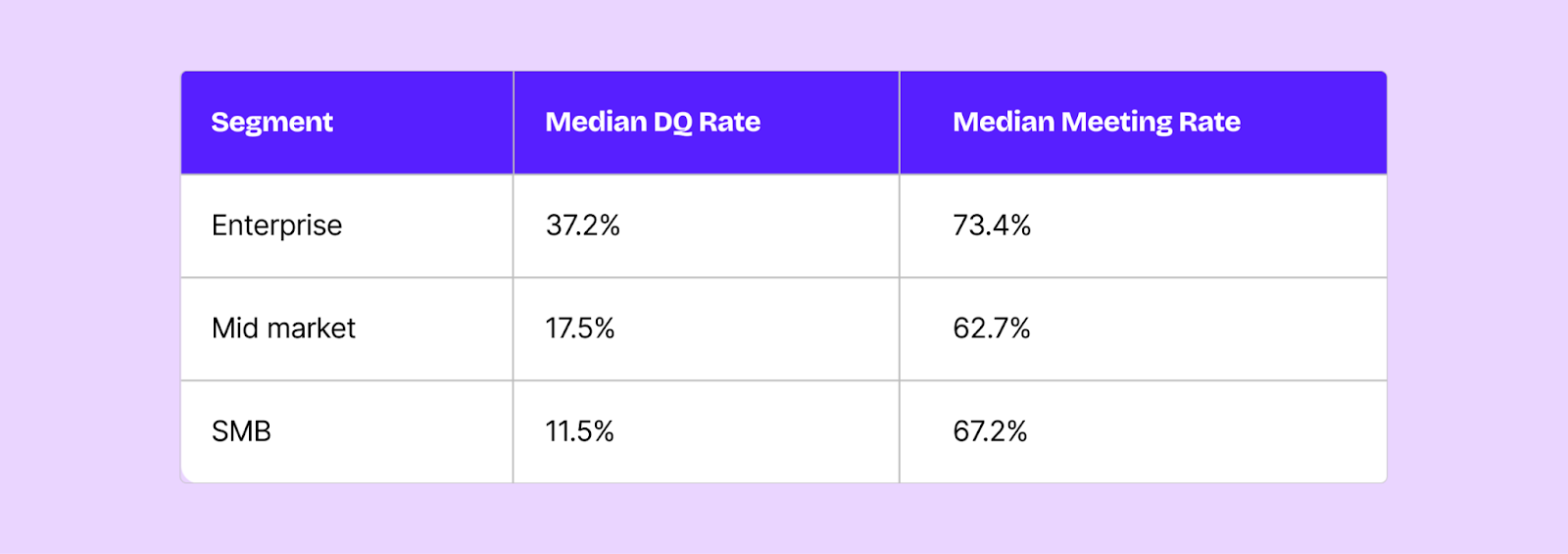
Enterprise companies disqualify at nearly 3x the rate of SMB companies and see the highest meeting conversion rates. They have narrower ICPs, higher deal values, and most importantly: more to lose from wasted meetings. So they need to be pickier, and it pays off in conversions.
SMB companies, on the other hand, achieve strong meeting rates despite lower DQ rates. This is likely due to their broader ICP definitions.
SMB companies, on the other hand, achieve strong meeting rates despite lower DQ rates. This is likely due to their broader ICP definitions.
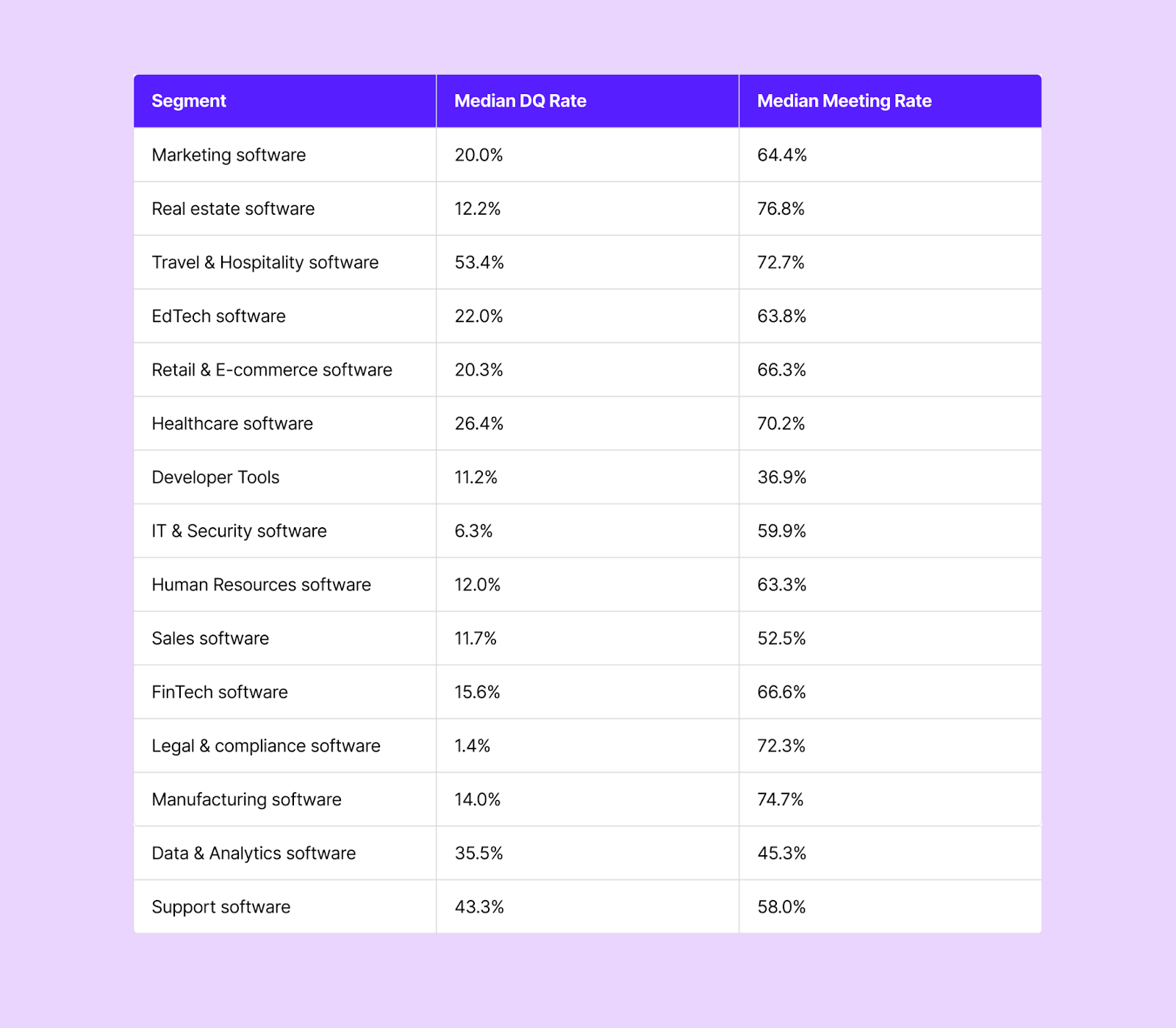
Travel & hospitality software companies filter aggressively while converting 73%, whereas legal & compliance software convert 72% with a median DQ rate of 1.4%, suggesting that their audience self-selects well.
Manufacturing software & real estate software companies lead in meeting conversion rates (76.8% and 74.7%, respectively) with moderate DQ rates, suggesting highly targeted inbound traffic.
Another number that most companies miss, even among leads that pass qualification, is that on average 33% of those qualified don’t book a meeting. They see the rep’s calendar but don’t pick a time. That’s a third of your qualified pipeline leaking even before a meeting happens.
The best companies route these “qualified but not booked” leads to SDRs for immediate follow-up, turning a passive drop-off into an active outreach opportunity. They also create different DQ experiences for different wrong-fit categories.
One company built separate redirect pages for D2C leads vs. B2B leads who just didn’t book. They treat disqualification as routing instead of rejecting them.
Impact on Pipeline and Revenue
The impact of effective qualification compounds:
- Faster speed-to-lead: Qualified leads get routed to the right rep instantly, instead of waiting for a 24-hour SDR review.
- Higher show rates: Leads who self-select through a qualification process and immediately book a meeting are more likely to show up than leads who get a cold outbound follow-up days later.
- Better close rates: When reps take meetings only with leads that meet minimum criteria, their win rates improve because they’re working with prospects who are more likely to buy.
- More accurate forecasting: A pipeline with qualified opportunities is easier to forecast than one polluted with leads that have zero possibilities of closing.
Defining your lead qualification criteria
Before you roll up your sleeves and qualify leads, you need to define what a “qualified lead” means for your business. And this isn’t a one-time exercise: your criteria will evolve as you scale.
The best qualification criteria share three properties:
- Measurable: You can evaluate this from form data, enrichment, or CRM fields
- Predictive: You can correlate them with your closed-won deals
- Practical: You can collect or enrich the data without killing your conversion rates
Different types of lead qualification criteria
Here are the lead qualification criteria ranked by how frequently they’re used:
Tier 1: Nearly Universal
- Company size / Employee count: This is the most common qualification criterion. Companies set a minimum threshold (e.g., 50 employees, 200 employees, etc.) and disqualify everything below it.
- Geography / Region: Almost every company with multiple sales reps routes by geography. This helps in two ways: it’s a qualification criterion (are they in a market we serve?) and a routing criterion (which rep covers this territory?). Companies use IP-based enrichment, form fields, CRM territory maps, and zip code lookups.
- CRM ownership: Most companies check whether the lead already exists in their CRM before applying any other criteria. If so, route to the existing owner and prevent an awkward situation where a prospect doesn’t meet two reps.
Tier 2: Common
- Company revenue / Annual turnover: Revenue brackets often determine whether a lead gets an AE or an SDR. For instance, a company can set the line at $3 million. Below that, the lead goes to SDRs for nurturing; above, it goes directly to a sales rep.
- Industry / Vertical: Some companies serve specific verticals and disqualify everything else. Others use industry to route to specialist reps.
- Email type: Business email vs. personal email is another common qualification criterion. Many companies auto-disqualify Gmail, Yahoo, and Hotmail addresses, or route them to a separate workflow for SDR review.
- Business type / ICP fit: For companies with a narrow ICP, a single binary question can be the most powerful qualifier. For example, an automotive software company can ask “Are you a dealership” on their form. Non-dealerships (motorcycle companies, car washes, tire shops) are immediately disqualified.
Tier 3: Catching on
- Target country: Similar to geography, except at a granular level.
- Number of locations / seats: A proxy for company size that’s specific to multi-location businesses (restaurant chains, retail, real estate, etc.)
- Product of interest: This is for multi-product companies, the product chosen by the prospect determines the routing (and sometimes the qualification).
- Estimated budget / Deal size: Some companies include a budget or deal size field and use it as a routing condition.
Tier 4: On the rise
- Job title / seniority: Checked via enrichment tools rather than a form field. Used to ensure you’re talking to someone with decision-making authority.
- Lifecycle stage: Whether the lead is already an MQL or SQL in your CRM can determine routing
- Existing customer status: Existing customers who fill out a demo form should be routed to their CSM or account manager, not the new-business AE team.
How to build your lead qualification criteria?
Start with your closed-won deals. Look at the last 30-50 deals that closed and identify the common firmographic traits: company size range, industries, geographies, revenue bands, job titles of the buyers. That’s your ICP.
Next, check your closed-lost and no-decision deals and look for traits that your closed-won deals don’t have. Those differences become your DQ criteria.
Keep it simple at first, and then build on it. Most effective companies use just two or three (company size + geography, industry + company size + email type, etc.), and then add more granularity later.
Remember: the most important thing is to start with criteria that you can actually evaluate at the point of qualification.
Lead Qualification Frameworks
Sales teams worldwide have developed several frameworks for qualifying leads during conversations. While most companies have started using simple binary criteria in their automated routing rules, these frameworks remain valuable for the human side of qualification: SDR calls, discovery meetings, and pipeline reviews.
BANT
Budget, Authority, Need, Timeline
BANT is the oldest and most widely known qualification framework, originally developed by IBM. It asks four key questions:
- Budget: Does the prospect have the budget to purchase?
- Authority: Is the person you’re speaking with the decision-maker (or can influence the decision)?
- Need: Does the prospect have a genuine problem your product solves?
- Timeline: Is there urgency or a defined timeline for making a decision?
When to use BANT: BANT works well for transactional, shorter sales cycles where budget is a hard constraint. If you sell a product with a clear price point and the buying decision is relatively straightforward, BANT gives you a simple checklist.
Limitations: BANT falls short in modern enterprise sales where the buyer may not know their budget yet, the decision involves multiple stakeholders, and the need has to be created or shaped through the sales process. Asking “what’s your budget?” in a first call can feel tone-deaf when the prospect is still figuring out whether they have a problem.
CHAMP
Challenges, Authority, Money, Prioritization
CHAMP puts the customer’s challenges first rather than talking about their budget. The logic behind this method is if you understand the challenge first, the budget conversation becomes about ROI instead of the price. It asks four key questions:
- Challenges: What pain point / problem are they trying to solve?
- Authority: Who’s involved in the decision, i.e., what does the buying committee look like?
- Money: Can they justify the investment given their challenge?
- Prioritization: How urgent is this relative to their other priorities?
When to use CHAMP: Mid-market sales where the prospect has a clear pain point but hasn’t formalized a budget. CHAMP lets your reps build the business case during the qualification process rather than asking a budget number upfront.
MEDDIC
Metrics, Economic Buyer, Decision Criteria, Decision Process, Identify Pain, Champion
MEDDIC is the heavyweight framework: built for complex enterprise sales with long cycles and multiple stakeholders. It considers six key questions:
- Metrics: What quantifiable outcomes does the prospect need? What does success look like in numbers?
- Economic Buyer: Who’s the person with the budget authority, i.e., the one who ultimately signs the check?
- Decision Criteria: What criteria will they use to evaluate vendors: technical requirements, pricing, implementation timeline?
- Decision Process: What does their buying process look like: number of stages, who’s involved at each stage, etc.
- Identify Pain: What specific pain is driving this initiative? Is it acute or chronic?
- Champion: Do you have an internal advocate who will sell your solution when you’re not in the room?
When to use CHAMP: Enterprise sales with deal sizes above $50K, sales cycles longer than 3 months, and buying committees with 5+ stakeholders. MEDDIC is designed for situations where winning requires navigating internal politics instead of demonstrating product-market fit.
Limitations: MEDDIC is overkill for SMB or mid-market sales. It requires significant discovery time and works best when reps are managing a small number of high-value opportunities rather than a high volume of smaller deals.
FAINT
Funds, Authority, Interest, Need, Timing
FAINT was developed by the RAIN Group as an alternative to BANT for situations where the prospect doesn’t have a pre-allocated budget. It considers five key questions:
- Funds: Does the organization have the financial capacity to purchase, even if they haven't budgeted for it yet?
- Authority: Can the person you're talking to allocate or redirect funds?
- Interest: Is the prospect genuinely interested in solving this problem, or are they tire-kicking?
- Need: Is there a real, identified need that your solution addresses?
- Timing: What’s driving the timeline (or lack of one)?
When to use FAINT: Selling into organizations that don't pre-budget for your category. This is common in greenfield markets, new product categories, or when you're selling to teams that have discretionary budget authority. FAINT acknowledges that a prospect can have funds without having a budget line item.
SPICED
Situation, Pain, Impact, Critical Event, Decision
SPICED is a newer framework that emphasizes storytelling and the prospect's narrative. It asks five questions:
- Situation: What's the current state, i.e., what tools, processes, and team structure do they have today?
- Pain: What's broken or inadequate about the current state?
- Impact: What's the business impact of the pain? Revenue loss? Inefficiency? Risk?
- Critical Event: Is there a deadline, mandate, or event (new fiscal year, board mandate, competitive pressure, contract renewal) that’s driving action?
- Decision: How will they decide? What does their evaluation look like?
When to use SPICED: Sales teams that use a consultative approach and need to deeply understand the prospect's world before proposing a solution. SPICED is particularly effective for products that require behavior change or organizational buy-in beyond the immediate buyer.
GPCTBA/C&I
Goals, Plans, Challenges, Timeline, Budget, Authority / Consequences & Implications
Developed by HubSpot, this framework is the most comprehensive and cumbersome. It's designed to go beyond qualification and into full discovery. It considers seven questions:
- Goals: What are the prospect's quantitative goals?
- Plans: What's their plan to achieve those goals?
- Challenges: What's preventing them from executing their plan?
- Timeline: When do they need to achieve these goals?
- Budget: What financial resources have they allocated for this solution?
- Authority: Who takes the final call?
- Consequences & Implications: What happens if they don’t act?
When to use GPCTBA/C&I:
Practical recommendation: Don’t get hung up on picking the “right” framework. Most successful teams take elements from multiple frameworks and build a qualification checklist that reflects their specific sales motion.
Decision Matrix: Which Framework to Choose
How to qualify sales leads: step-by-step process
Step 1: Capture the right data at form submission
Everything starts with the form. The fields you collect determine what you can qualify on. At minimum, capture:
- Business email (this enables enrichment)
- Company name (helps with CRM matching)
- A qualifying field (company size, industry, role, or use case)
Many companies are reducing their forms to just name and email, and then using enrichment providers to fill in the firmographic data in real time.
Step 2: Validate the submission
Before running any qualification logic, validate:
- Email validity: Use an email validation service (like ZeroBounce) to block fake, disposable, or invalid email addresses.
- Email type: Decide whether personal email addresses (Gmail, Yahoo, Hotmail) are to be auto-disqualified, routed to a separate track, or treated the same as business emails. Most B2B companies treat personal emails as a disqualification signal or a lower-priority track.
- Spam detection: Flag obviously fake submissions (keyboard spam, test entries, competitor emails).
Step 3: Enrich the lead
At the moment of form submission, enrich the lead with third-party data like:
- Company size / Employee count
- Company revenue
- Industry / Vertical
- Company HQ location
- Job title / Seniority of the submitter
This enrichment needs to happen in real time (preferably within seconds of form submission) or you’ll lose the prospect. Some of the high-converting companies use the “waterfall enrichment” method, i.e., configure multiple enrichment sources (Clearbit, Apollo, CrustData, etc.) with an “OR” logic. This reduces false disqualifications from enrichment gaps.
Step 4: Evaluate against qualification criteria
With form data and enrichment data in hand, run the lead through your qualification rules. This typically happens in three layers:
- Hard disqualifiers (knockout criteria): Is the email valid? Are they in a country you serve? Are they the right business type? If any hard disqualifier triggers, the lead is disqualified. They don't see a calendar and may be redirected to a generic page or a self-serve resource.
- ICP matching: Does the company meet your size, revenue, and industry requirements? This is where thresholds matter: 50+ employees, $3M+ revenue, target industry, etc.
- Routing criteria: Upon passing the qualification criteria, which rep should the leads see? This layer evaluates geography, CRM ownership, sub-vertical, and team assignment.
Step 5: Route or disqualify
Based on your evaluation, you can either route the lead or disqualify it:
- Qualified + Existing CRM owner: Route to the existing owner's calendar.
- Qualified + No CRM owner: Route to the appropriate round robin based on geography, industry, or segment.
- Disqualified: Show a redirect page (not a dead end). Many companies create segment-specific disqualification pages.
- Didn't book (qualified but abandoned the calendar): Assign the lead to an SDR for outbound follow-up. This is the "safety net" that ensures qualified leads who don't self-schedule still get worked.
Step 6: SDR verification
Not every lead can be qualified automatically. Some require a human conversation:
- Leads from enrichment-proof ICP segments (niche use cases where firmographics don't predict fit)
- Leads where the enrichment returned incomplete data
- Leads that qualified on paper but have ambiguous intent
For these, the SDR's job is to conduct a brief qualifying conversation before booking the AE meeting. This is the classic SDR-to-AE handoff.
Step 7: Confirm sales-readiness
A lead becomes sales-ready (SQL) when:
- They meet your firmographic criteria (ICP match)
- A human has confirmed genuine need and intent (either through self-scheduling behavior or an SDR conversation)
- They have a defined timeline or triggering event
- They have authority (or access to authority) to make a purchasing decision
At this point, the lead enters the sales pipeline as a real opportunity.
20 Questions to Qualify a Sales Lead
Firmographic (answer from data, enrichment, or form fields)
- How many employees does the company have?
- What is their annual revenue?
- What industry or vertical are they in?
- Where is the company headquartered?
- Do they operate in a geography we serve?
- Are they an existing customer or account in our CRM?
- What is the submitter's job title and seniority level?
- Did they use a business email or personal email?
- Which product or solution did they express interest in?
- What is the source of this lead (organic, paid, referral, event)?
Conversational (ask during SDR or discovery call)
- What problem are you trying to solve?
- How are you handling this today?
- What prompted you to look for a solution now?
- What would success look like for you in 6 months?
- Who else is involved in evaluating solutions?
- What's your timeline for making a decision?
- Have you evaluated other solutions?
- Is there a budget allocated for this initiative?
- What would happen if you didn't solve this problem?
- What would need to be true for you to move forward?
When to disqualify a lead?
Disqualify immediately, if:
- The email address is disposable or invalid
- The company size is below your minimum threshold
- They’re not in a geography you serve
- They don’t match the business type you serve
- It’s a known competitor domain
Post-enrichment, disqualify if:
- The employee count or revenue falls below your ICP threshold
- The industry isn’t in your target list
- There’s no matching data from any enrichment provider (this is a judgment call. Some companies disqualify, others route to SDR)
After human review, disqualify if:
- There’s no genuine need or problem to solve (they were "just curious")
- There’s no timeline or urgency
- There’s no budget or ability to allocate funds and the deal size doesn't justify a long nurture cycle
- The prospect can't connect you to a decision-maker
- Their existing contract with a competitor doesn't expire for 18+ months
- Their use case doesn't match your product's capabilities
What disqualification should look like
Disqualification doesn't mean ghosting the lead. Here are some best practices from the high-converting companies we analyzed:
- Redirect to a relevant resource: Send them to a self-serve resource, a free tier, or educational content.
- Create segment-specific pages: One company built different redirect pages for D2C leads vs. B2B leads who just didn't book.
- Route to SDR for follow-up: Many companies route disqualified leads to an SDR round robin. The SDR can verify whether the disqualification was correct and, if the lead has future potential, add them to a nurture sequence.
- Track disqualification reasons: Log why each lead was disqualified. This data helps you refine your criteria over time and identify if you're disqualifying good leads by mistake.
Lead scoring: How to grade & rank prospects
Lead qualification answers the question, “Should we work this lead at all?”, whereas lead scoring asks, “How urgently should we work on it and who should do it?”
Lead scoring assigns numeric values to leads based on a combination of firmographic attributes (who they are) and behavioral signals (what they've done). The composite score determines priority and routing.
The two dimensions of lead scoring
Firmographic scoring (fit)
Assign points based on how closely a lead matches your ICP
Behavioral scoring (intent)
Assign points based on actions that signal buying intent
Setting score thresholds
Define what the scores mean, for example:
- 80+ points: Hot lead. Route immediately to AE. This lead has both high fit and high intent.
- 50-79 points: Warm lead. Assign to SDR for a qualification call. They look like a fit but haven't shown strong buying signals yet.
- 20-49 points: Nurture. Add to an automated email sequence. They've shown some interest but aren't ready for sales.
- <20 points: Cold. Monitor passively. Don't spend active sales or SDR time.
The reality check on lead scoring
Most-mid market companies don’t use formal lead scoring with composite numeric values. Instead they use pass/fail qualification rules that function as implicit scoring, such as:
- Employee count above 50 = qualified
- Company revenue > $3M = goes to AE, company revenue <$3M = goes to SDR
The companies that do invest in formal lead scoring tend to be the ones with:
- High inbound volume (1000+ leads per week)
- Mature marketing automation (Marketo, Pardot, HubSpot Marketing Hub Enterprise)
- Long sales cycles where behavioral nurture signals matter
- Large SDR teams that need objective prioritization criteria
If you're getting fewer than 500 inbound leads per month, binary qualification rules will serve you better than a complex scoring model.
Lead qualification with AI & automation
2 years ago, a typical inbound lead might wait hours or even days for an SDR to review the submission, research the company, and send an outreach email. Now, the best-performing teams qualify leads within 5 seconds: at the moment of form submission, before the prospect has even left the page.
This section covers how to set up that kind of automated qualification in practice.
Setting up lead qualification in your CRM
Your CRM is the foundation. Here’s how to configure it for automated qualification:
#1: Define your qualifying properties
Create or identify the CRM properties you'll use for qualification:
- Employee count (company property)
- Annual revenue (company property)
- Industry (company property)
- Country/Region (contact or company property)
- Lifecycle stage (contact property)
- Lead source (contact property)
- Contact owner / Company owner (for ownership matching)
#2: Connect enrichment sources
Integrate your enrichment providers directly with your routing tool or CRM:
- Clearbit: most widely used for company firmographics (size, revenue, industry, HQ)
- Apollo: employee count, vertical, contact details
- ZoomInfo: employee data, seniority, org charts
- CrustData / Ocean: supplementary data providers for waterfall coverage
#3: Set up matching rules
Matching rules check whether the lead already exists in your CRM:
- Contact owner lookup: Does this email match an existing contact with an owner?
- Account/company owner lookup: Does this company domain match an existing account?
If a match is found, route to the existing owner. If not, proceed to qualification and round robin.
#4: Configure distribution rules
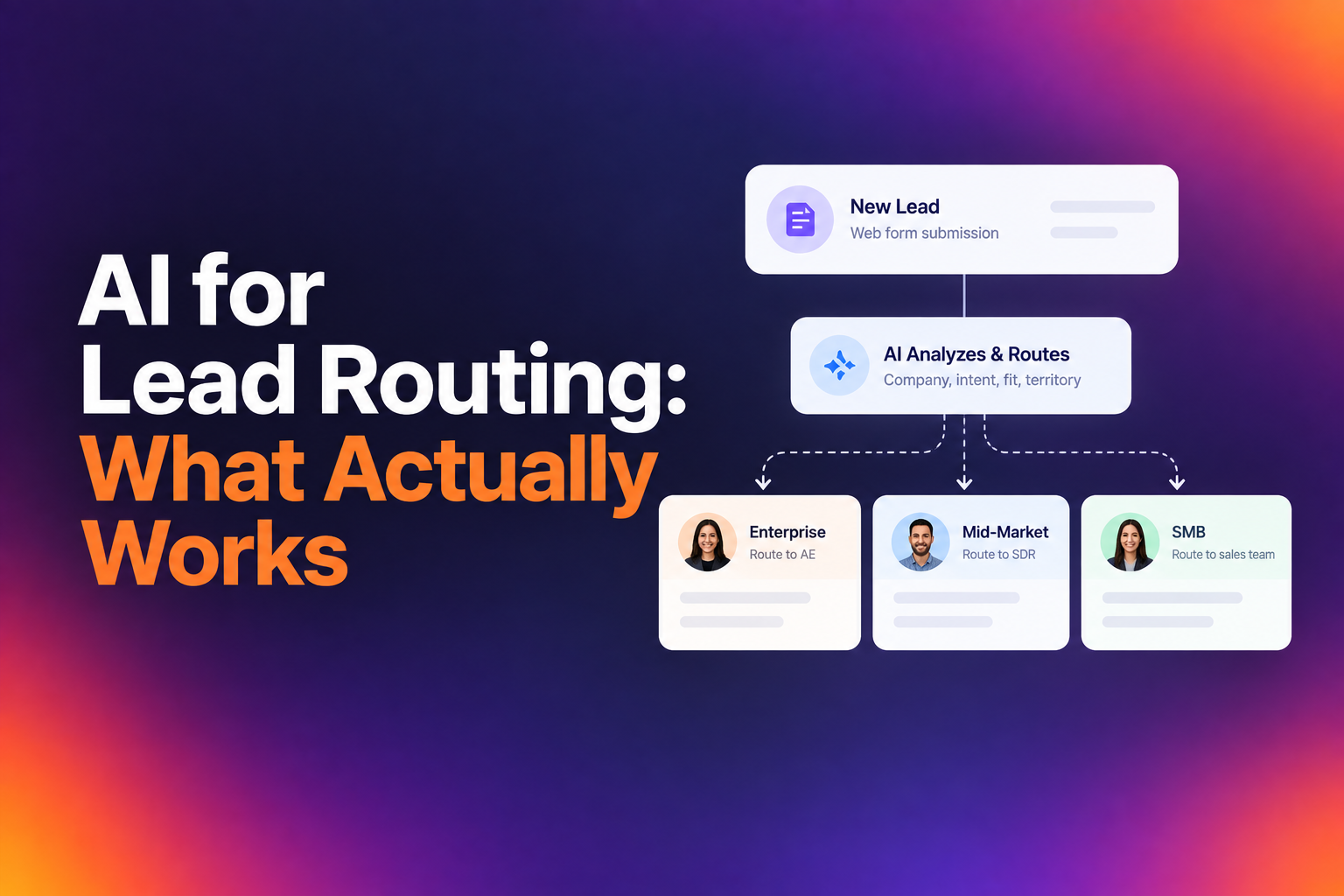
Distribution rules determine which team or round robin queue handles the lead based on qualification criteria. For instance:
- Rule 1: If company size > 500 employees AND region = North America → Enterprise AE round robin
- Rule 2: If company size 50-499 AND region = North America → Mid-Market AE round robin
- Rule 3: If company size < 50 → Disqualify (redirect to self-serve)
- Fallback (if no rules match): If no rules match → SDR round robin
Automation workflows for lead qualification
Real-time Qualification Workflow
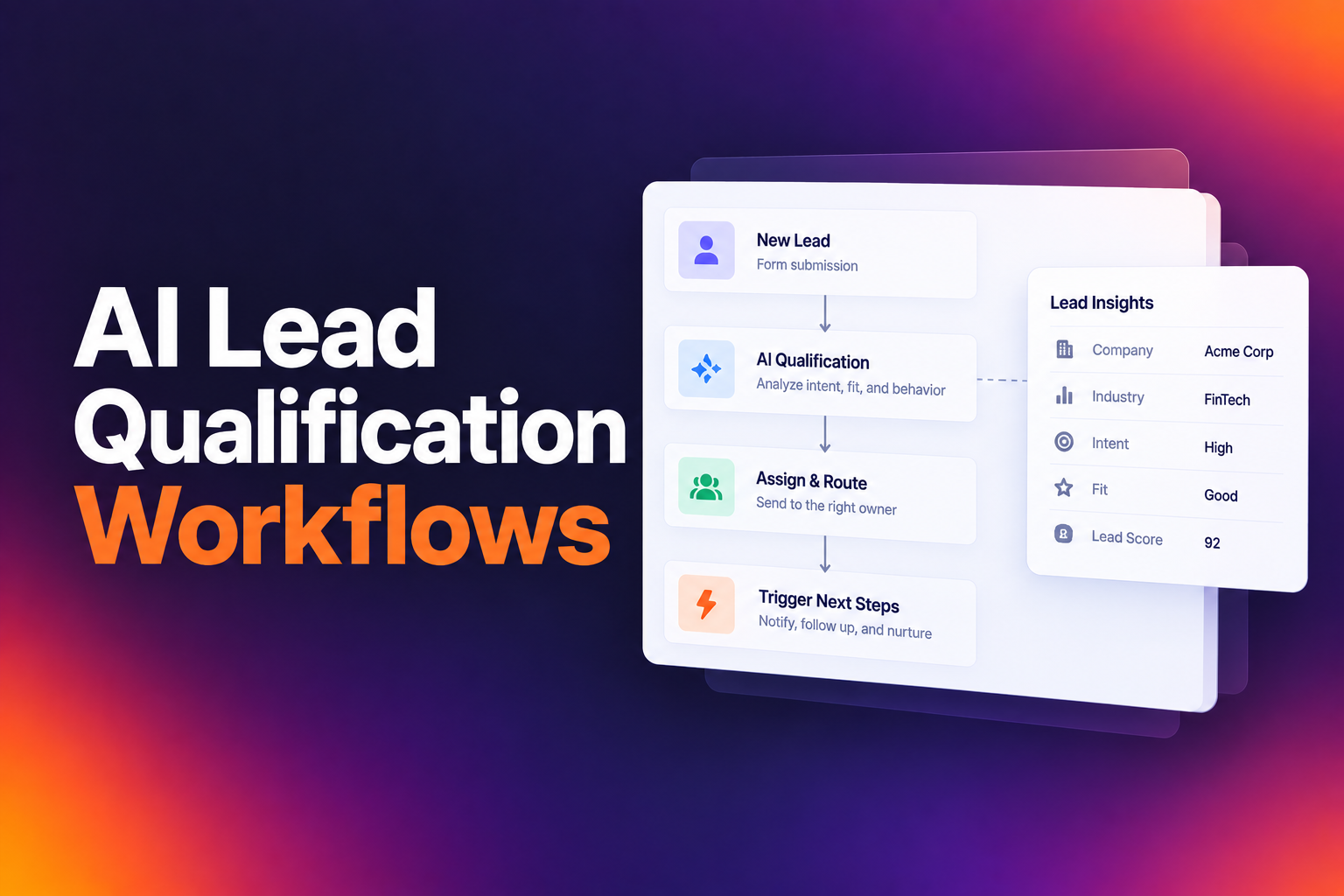
The modern qualification workflow happens in seconds:
- Form submission triggers the workflow
- Email validation checks for invalid/disposable addresses
- Enrichment fires to gather firmographic data
- CRM lookup checks for existing contact/account owner
- Qualification rules evaluate the lead against your criteria
- Routing sends the qualified lead to the right calendar (or disqualifies and redirects)
- CRM update creates (or updates) the contact record with enrichment data, meeting details, and routing outcome
Total elapsed time: 2-5 seconds
Non-booked Lead Workflow
For leads that qualify but don't schedule a meeting, i.e., they saw the calendar but didn't pick a time:
- Contact is created/updated in CRM with "not booked" status
- Lead is assigned to an SDR via round robin
- SDR receives a notification (Slack, email, or CRM task)
- Automated outreach sequence starts (email + optional phone task)
- If SDR books a meeting, it goes on the calendar as an SDR-sourced meeting
- If no engagement after X touches, lead moves to long-term nurture
Disqualified Lead Workflow
- Contact is created/updated in CRM with "disqualified" status and reason
- Disqualification reason is logged (company size, geography, email type, etc.)
- Lead may be assigned to an SDR for manual review (optional)
- Lead receives a redirect to a segment-appropriate resource page
- If disqualified leads are valuable enough, add to a low-touch nurture sequence
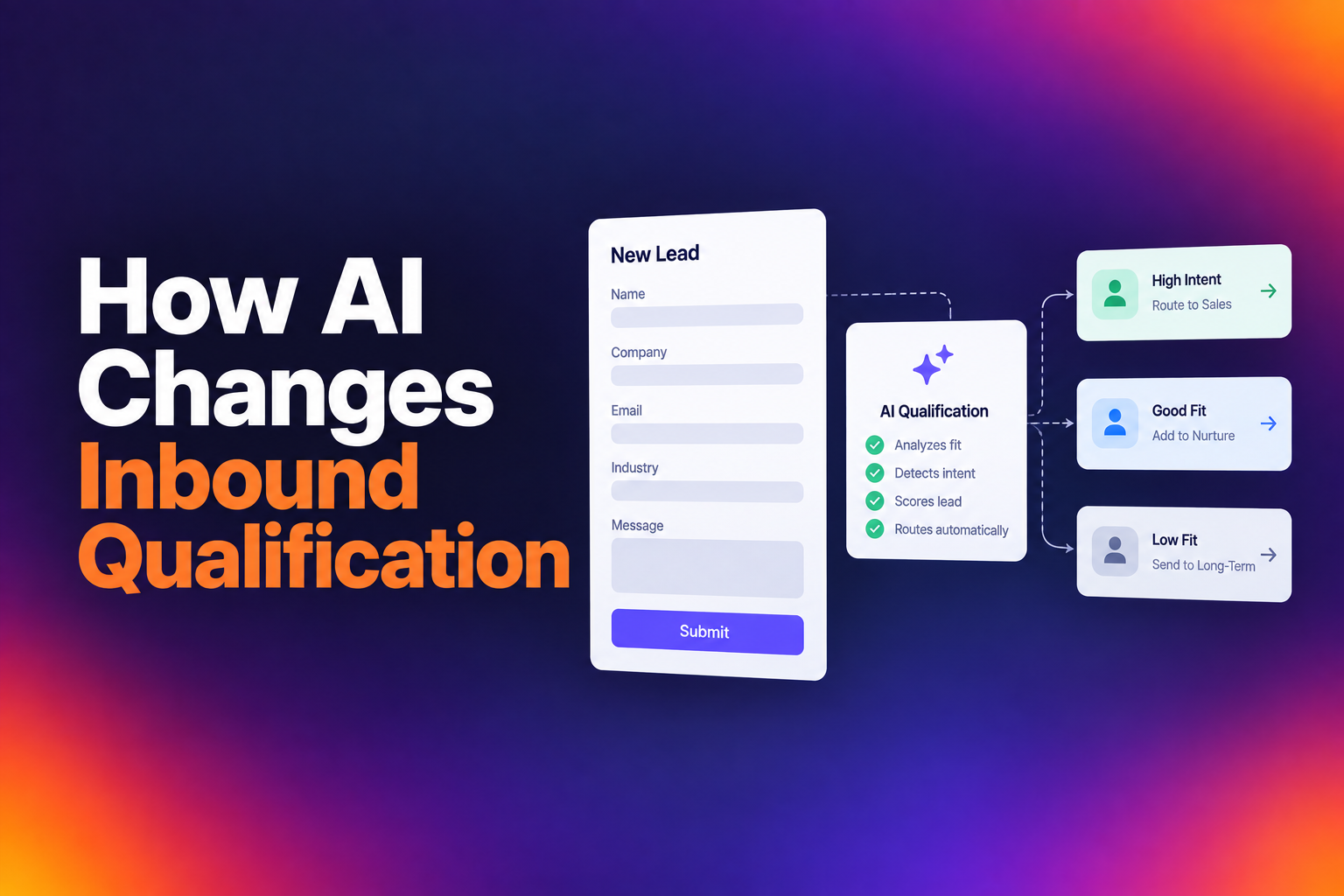
AI-Powered Qualification
Several teams we studied are beginning to integrate AI SDRs into their qualification workflow:
- Qualified leads get instant calendar access
- Leads that fall into a gray zone (enrichment incomplete, borderline criteria) get routed to an AI SDR
- The AI SDR conducts an initial qualifying conversation (chat or email) and books the meeting if the lead passes
- Human SDRs focus only on leads the AI can't resolve
This hybrid model is still early, but the direction is clear: AI handles the volume, humans handle the edge cases.
Common lead qualification mistakes to avoid
#1: Enrichment latency causing false disqualifications
This is the number one operational issue we found. One of our customers described it bluntly: “This is one of things that kind of keeps hurting us. We currently qualify people if they're at a company of 50 employees or more. However, the speed of that enrichment is too slow right now, so most viable leads get disqualified."
The fix: Waterfall enrichment with OR logic across multiple providers. If Clearbit doesn't return data in time, Apollo tries. If Apollo doesn't have it, CrustData tries. Any positive match qualifies the lead.
#2: Asking for data you could enrich
Every form field without a purpose reduces conversion rates. For instance, asking “how many employees does your company have?” on a form could add friction, when your enrichment provider could tell you the answer from just their email address.
The fix: Reduce your form to the minimum required fields (name, business email, and maybe one qualifying question). Use enrichment for everything else.
#3: No fallback for enrichment gaps
What happens when your enrichment provider returns nothing? If you say, “the lead gets disqualified”, you’re losing good leads. Enrichment providers might not have data on new startups or businesses.
The fix: Define a clear fallback. Include options like: routing to SDR for manual qualification, showing the calendar anyway with a default round robin, or using a second enrichment provider in sequence.
#4: Routing rule sprawl
Routing rules multiply as sales teams grow. AEs request specific conditions for their territories, managers add edge cases, and over time, you end up with dozens of overlapping rules that are impossible to debug.
The fix: Audit your routing rules quarterly. Document every rule, who requested it, and why. Remove rules that no longer match your team structure. Keep the core logic simple and use CRM ownership as the primary routing mechanism, with criteria-based round robin as the fallback.
#5: Treating disqualification as deletion
Disqualified leads are not worthless. They’re probably not ready yet or they might be in the wrong segment. So throwing them away means you might be leaving money on the table.
The fix: Route disqualified leads to SDRs. Create nurture sequences for different disqualification reasons. Track disqualification rates and reasons to identify if your criteria are too aggressive.
#6: Not logging qualification outcomes
If you can’t see why a lead was qualified or disqualified, you can’t improve your process. Multiple companies we analyzed cited routing logs as a critical capability, and the lack of them as a reason for switching tools.
The fix: Ensure your qualification system provides a clear audit trail for every submission: what data was available, which rules were evaluated, what the outcome was, and who the lead was assigned to.
#7: Qualifying too aggressively on geography
IP-based geo-enrichment isn't perfect. VPN users, travelers, and remote workers can trigger geography-based disqualification even when they're a great fit.
The fix: Use geography as a routing criterion (which rep gets the lead) more than a qualification criterion (whether the lead gets a meeting at all). Have a "rest of world" catch-all that routes to a general round robin rather than disqualifying.
#8: No separate handling for personal emails
A Gmail address isn’t always a bad lead. Founders of early-stage companies, freelance consultants, and executives who prefer personal email for vendor evaluations all use Gmail. Auto-disqualifying all personal emails is too blunt.
The fix: Route personal emails to a separate track rather than an outright disqualification. Personal emails go to SDRs for manual review instead of a dead end.
#9: Misaligned qualification criteria between marketing & sales
Marketing celebrates hitting MQL targets, while sales complains the leads are garbage. This disconnect usually means that the qualification criteria are either too loose or they don’t predict actual sales readiness.
The fix: Define qualification criteria jointly between marketing and sales. Revisit them quarterly based on actual conversion data. Instead of “did the lead meet our criteria?”, ask “did the leads that met our criteria actually close?”
#10: Running zero disqualification
Our Breaking Inbound data shows that 39% of companies run no disqualification at all. And the consequences are measurable: companies with 0% DQ rates average a 62.3% meeting rate, while those that actively disqualify see rates climbing to 67-71%.
Even a basic disqualification layer (personal email filtering, minimum company size) can meaningfully improve the quality of meetings on your reps' calendars.
The fix: If you're currently running zero disqualification, start with the lowest-effort, highest-impact filters: block invalid emails, disqualify personal email addresses (or route to a separate track), and set a minimum company size threshold. These three rules alone will meaningfully improve your meeting quality.
#11: Setting it and forgetting it
Qualification criteria aren’t permanent: your ICP evolves, your team structure changes, new products launch. The routing rules you set up six months ago may disqualify the leads you want now.
The fix: Review qualification criteria and disqualification rates monthly. Look for: leads that were disqualified but later became customers through other channels, leads that qualified but churned quickly, and routing errors.
Lead qualification best practices checklist
How to measure success: lead qualification KPIs
Primary KPIs
#1: Qualification rate
What it measures: Percentage of inbound leads that pass qualification criteria
Formula: (Qualified leads / Total inbound leads) x 100
Benchmark: Varies by segment: Enterprise qualifies only 62.8%, while SMB companies qualify 88.5%.
What to watch for: Track the trend along with the value. If your qualification rate is dropping over time, investigate whether your traffic sources have shifted or if your routing rules have become too restrictive.
#2: Disqualification (DQ) rate
What it measures: Percentage of inbound leads filtered out by qualification rates
Formula: (Disqualified leads / Total inbound leads) x 100
Benchmark: Varies by segment: Enterprise’s median is 37.2%, while SMB companies qualify 11.5%.
What to watch for: Track this by reason: if 80% DQ are in the “wrong geography”, your marketing targeting may need adjustment.
#3: Qualified-to-booked meeting rate
What it measures: Of the leads that pass qualification, how many actually book a meeting?
Formula: (Meetings booked / Qualified leads) x 100
Benchmark: The overall median meeting rate is 62% based on our analysis of 1M+ form submissions. But the range varies across company segments and industries.
What to watch for: A low rate means your calendar experience has friction, your available time slots don't match prospect time zones, or your qualification is too generous.
#4: Meeting show rate
What it measures: Of meetings booked, how many prospects actually show up?
Formula: (Meetings attended / Meetings booked) x 100
Benchmark: Ideally, the no-show rate should be under 5%. This indicates that when leads self-qualify and self-schedule, they show up.
#5: MQL-to-SQL conversion rate
What it measures: Of leads that marketing qualifies, how many does the sales team accept as genuine opportunities?
Formula: (SQLs / MQLs) x 100
What to watch for: This is the ultimate test of alignment between your qualification criteria and actual sales readiness. If marketing is qualifying 1,000 MQLs per month and sales only accepts 100 as SQLs, your qualification criteria are misaligned.
Secondary KPIs
#1: Speed-to-lead
What it measures: Time from form submission to first meaningful contact (calendar shown, SDR outreach, or meeting booked)
Benchmark: Under 5 minutes for automated qualification, under 1 hour for SDR-mediated qualification
Why it matters: Every hour of delay reduces the likelihood of conversion. Instant qualification (calendar shown at form submission) is the gold standard.
#2: Routing accuracy rate
What it measures: Of qualified leads that didn’t schedule, how many got SDR follow-up within SLA?
Why it matters: Misroutes waste time and create bad prospect experiences. Track this by reviewing routing logs and flagging cases where leads needed to be manually reassigned.
#3: Pipeline generated from qualified leads
What it measures: Total pipeline value from leads that passed through your qualification process
Formula: Sum of opportunity values for deals sourced from qualified inbound leads
Why it matters: This is the ultimate output metric. If your qualification process is working, the pipeline it produces should have a higher average deal size and win rate than unqualified or manually-sourced pipeline.
FAQs
Let RevenueHero help your team turn high-intent users into booked meeting without slowing down your funnel.