What’s an acceptable form submission-to-booked meeting conversion rate?
If you’re a marketer or an Ops person, you’re quite familiar with this conversion conundrum. Fortunately, we found the answer—by analyzing over a million qualified form submissions across our customer base.
The median inbound conversion rate is 62%, while our top performers hit 78% and above—turning nearly 8 out of 10 hand-raisers into qualified booked meetings.
While we’d love to take all the credit here—because they’re using RevenueHero—we knew there was more to the story. So, we dug deeper and one thing stood out: their demo pages.
Your demo page is important because that’s where marketing effort translates into sales opportunity. Where buyer intent turns into booking or bounce.
You spend countless hours not just to build an awesome demo page, but in driving traffic to it: brand campaigns, webinar series, funny and relatable social media posts.
But your sales team cares more about the number of qualified form fills received than the tens of thousands of views your demo page gets.
You check your conversion rates: 500 form fills, 150 booked meetings. That’s a conversion rate of 30%. That’s not bad, right?
Honestly, you could do a lot better. Think about it: the median inbound conversion rate is 62%. Which means, for the same 500 form fills:
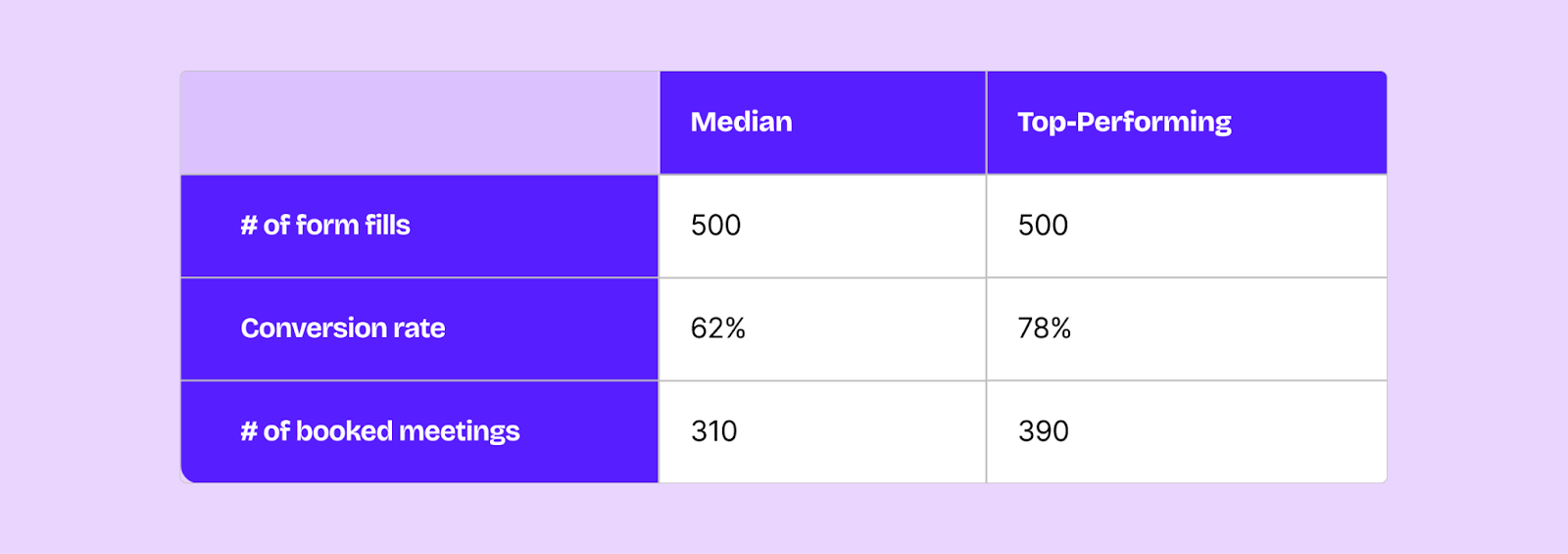
You have the potential to get 160–240 additional sales conversations, starting with optimizing your demo page.
We dissected 50 killer demo pages and identified exactly what separates the best from the rest. These are proven patterns used by companies who consistently convert 70%+ demo form fills into booked meetings.
To make this more snackable, we’ve divided it into 3 main chunks:
Form aspects: What should an ideal demo booking form look like?
Page aspects: What are the ingredients of a high-converting demo page?
Technical aspects: What are some key pointers you can share with your dev team?
Plus, you also get a couple of cool bonuses:
- A template of a high-performing demo page
- A checklist for marketers: the do’s & don’ts; and
- A 90-day roadmap to build a new demo page (or fix your existing one)
Ready? Let’s dive in!
Part I: Form aspects
Aspect I: How many fields is too many?
Conventional wisdom tells us that fewer fields = more conversions.
The data paints a different picture: on average, companies convert at 77% with 2 fields, and 76% with 13 fields. So, does field count barely matter?
The optimal number depends on your industry. Buyer behavior varies by industry, and they’re accustomed to a specific set of questions based on the products they’re evaluating. For instance, healthtech buyers expect to answer the number of clinics they operate, their practice management system (PMS), and compliance requirements.
In short: blindly following generic benchmarks for form fields might do more harm than good.
The difference isn’t how many fields you have. It’s whether each field enables your form to match the right lead to the right rep. Field count alone doesn’t determine performance. Field quality does.
Examine what each field enables you to do:
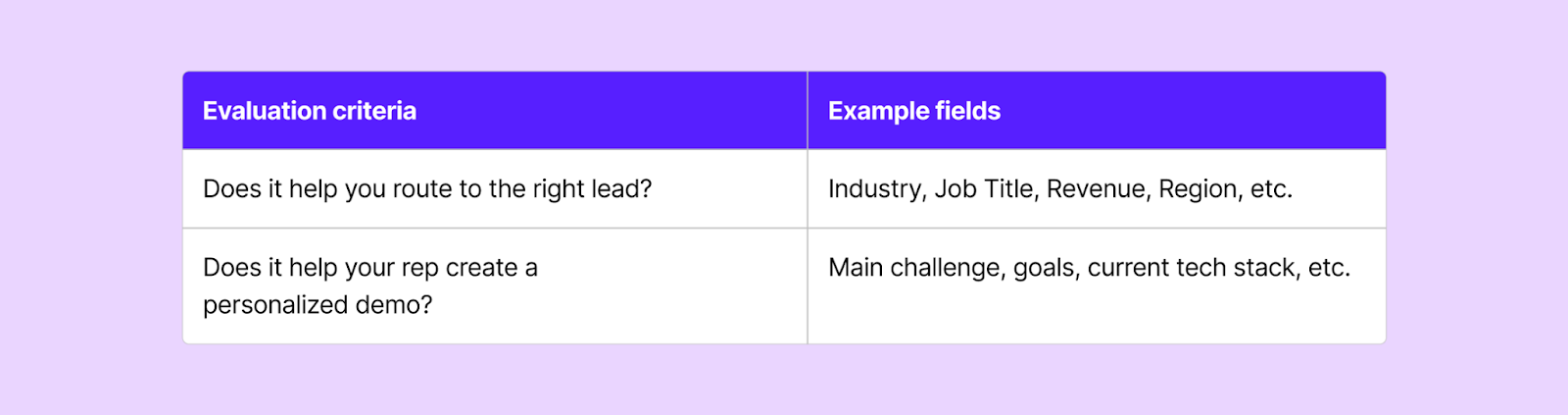
If your field does neither, you can eliminate it from the form.
Aspect II: The Power of Dropdowns
High-performing demo pages use dropdowns for nearly 20% of their fields:
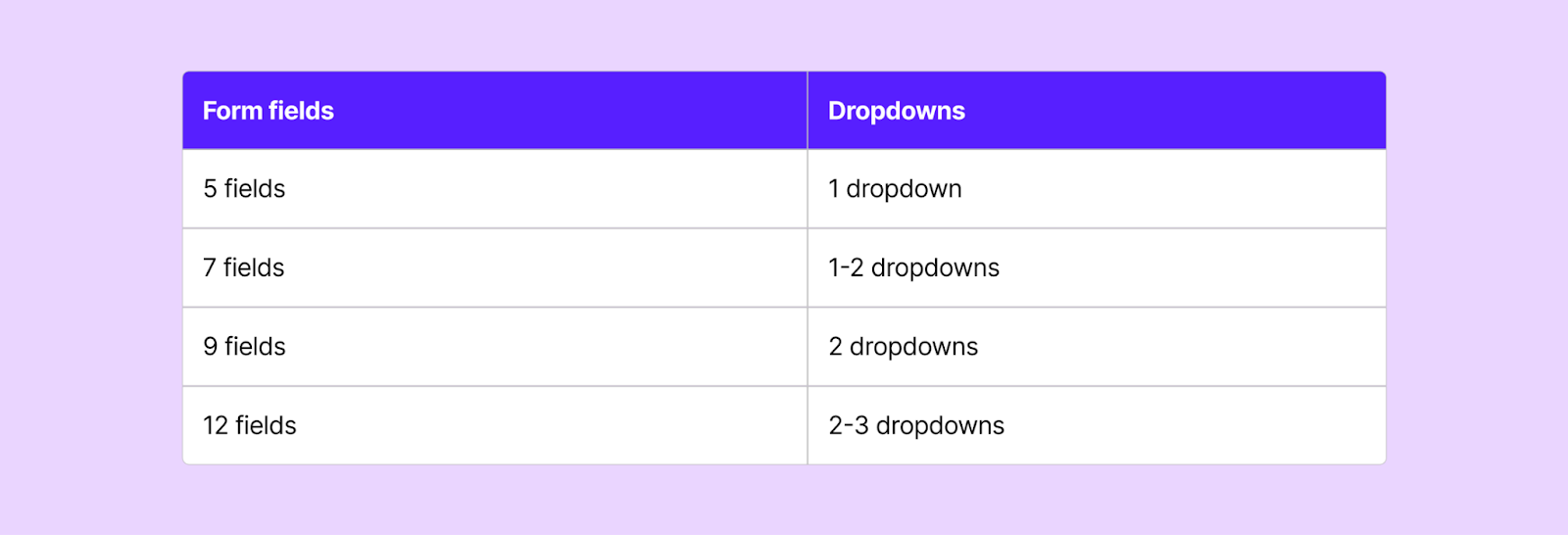
One of our customers, an automotive software company, converts 87% of their form fills into booked meetings. Their secret? A powerful dropdown: “What best describes your business?”
This single field tells them whether the lead is a fit and which rep should take the call.
Dropdowns are way more effective than free text fields, because they eliminate the massive friction of “typing in a response”. Plus, you can control the data quality. Instead of getting “vice president of marketing”, “VP of marketing”, or “vp - marketing”, you get one clean option: VP of Marketing.
Pro tip: Build your dropdowns based on your ideal customer profile.
Aspect III: First Name + Last Name >>> Full Name
This modification is subtle, yet significant for operational efficiency.
75% of the companies that convert more than 8 hand-raisers into booked meetings capture first name and separately:

That’s a 3% lift. Small, yes—but when you’re converting hundreds of demos monthly, these fractional improvements compound into revenue growth. Also, separate fields give you:
- Better CRM data quality: No more guessing which part is the first name
- Personalized outreach: Automated emails don’t look or feel automated when you use first names. “Hi Jane” sounds more human-like compared to “Hi Jane Smith”
- Proper sorting & segmentation: You can sort by last name without spending hours on manual cleanup
Part II: Page aspects
Aspect I: The Two-Column Hero Layout
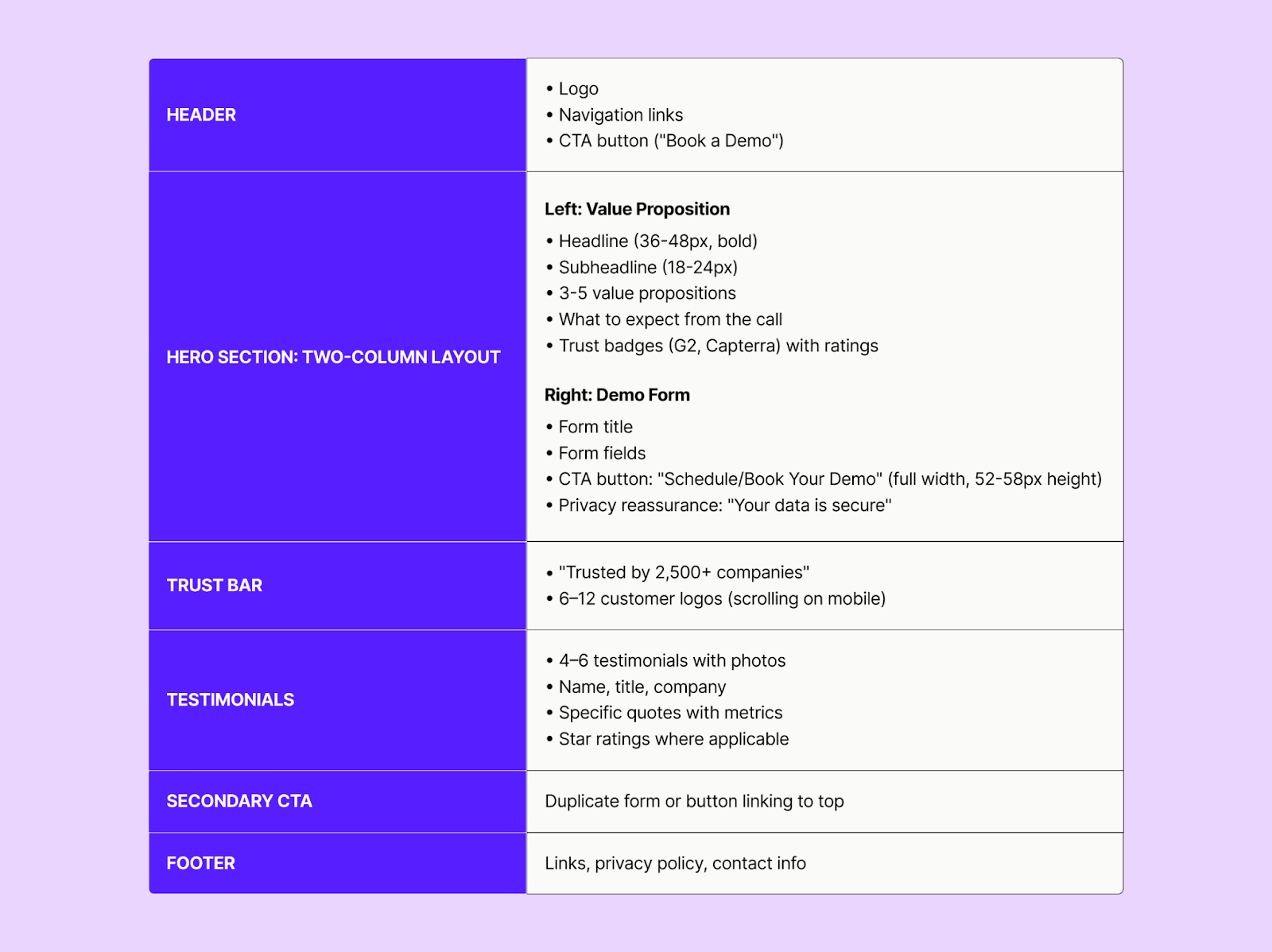
60% of the top performing pages use a two-column hero structure:
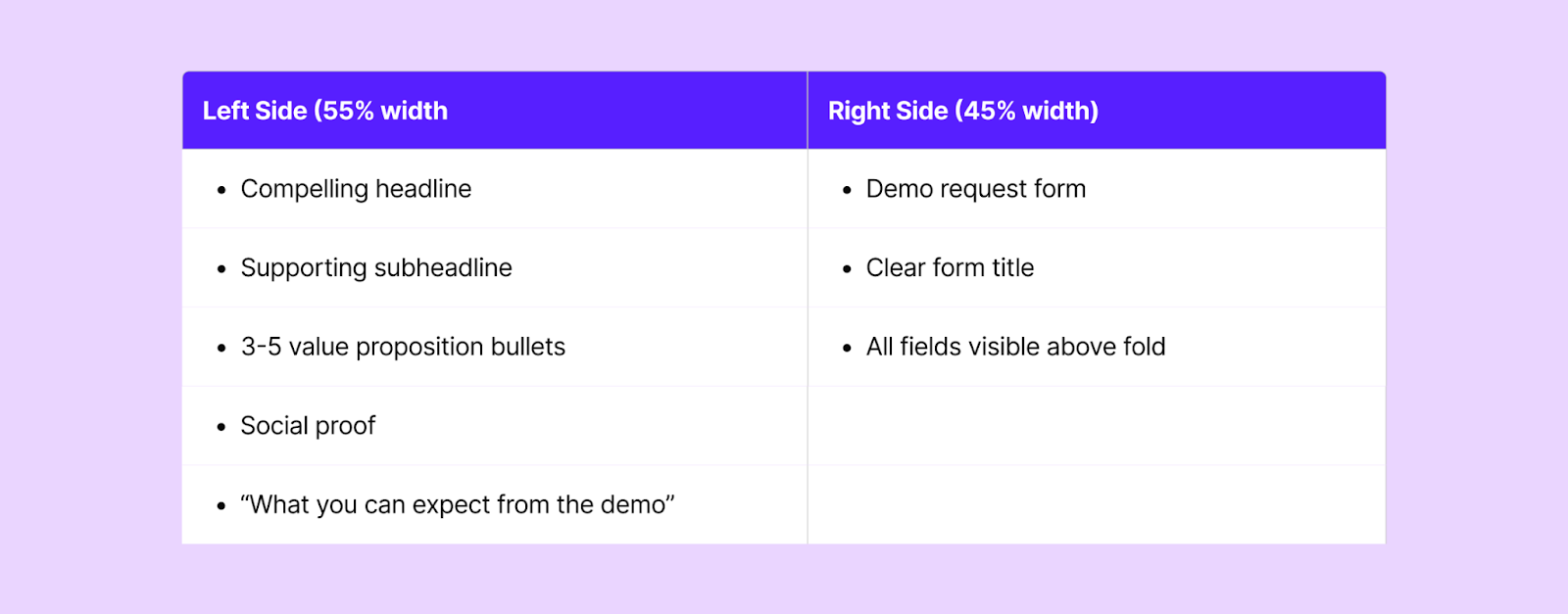
This layout makes your form immediately visible, while giving space to add credibility, communicate value, and build trust. Directly below your hero section, you can add the trust bar:

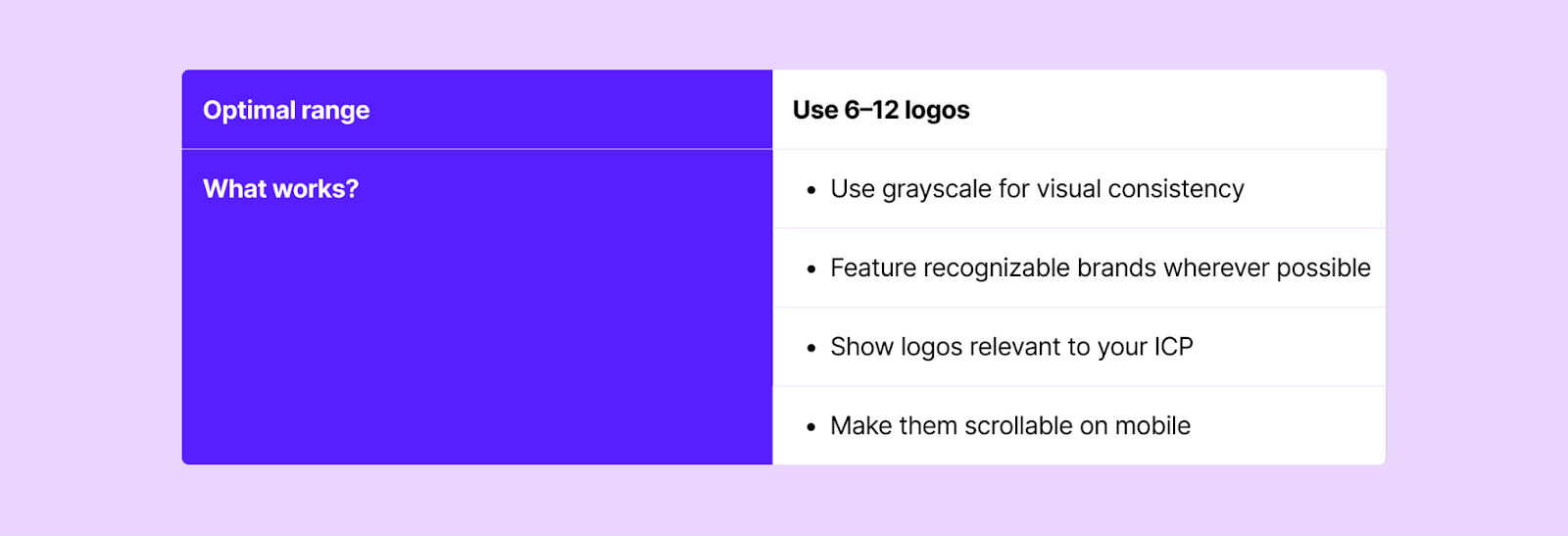
For consistency and good visual cohesion, use grayscale logos of the same size.
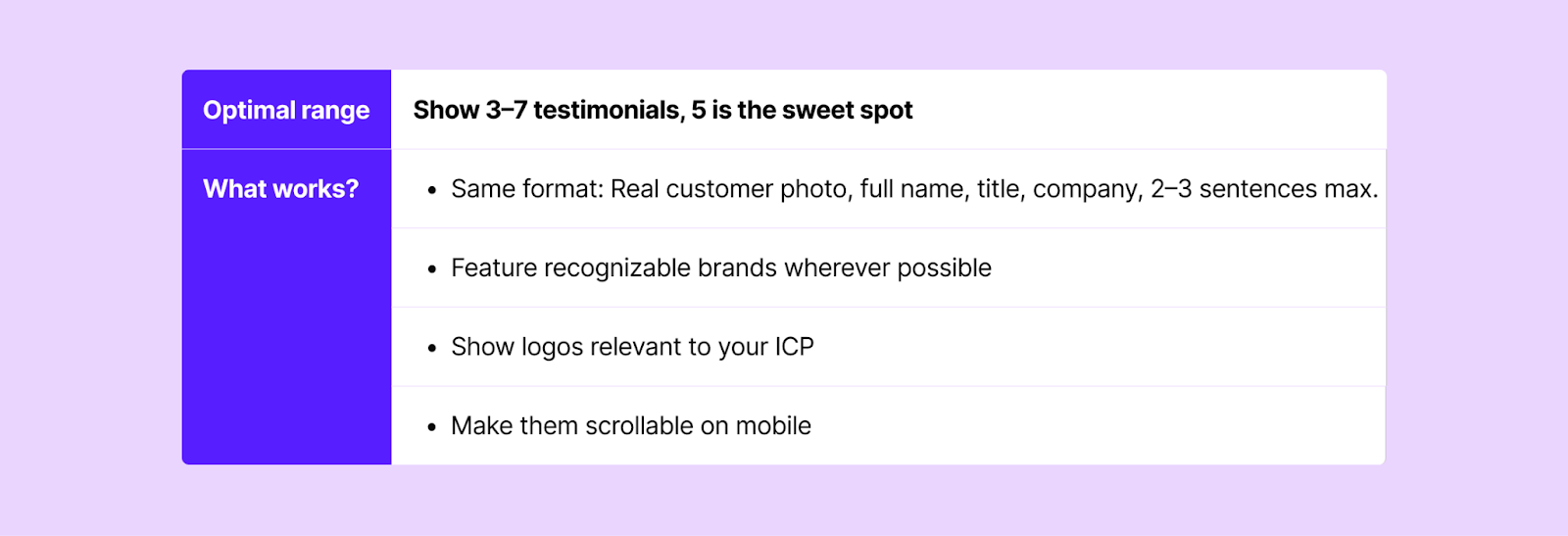
Aspect II: Social proof—The Goldilocks Zone
Social proof has become table stakes for B2B software. But there’s a sweet spot: too little makes you look unestablished, while too much makes you look desperate.
Customer logos
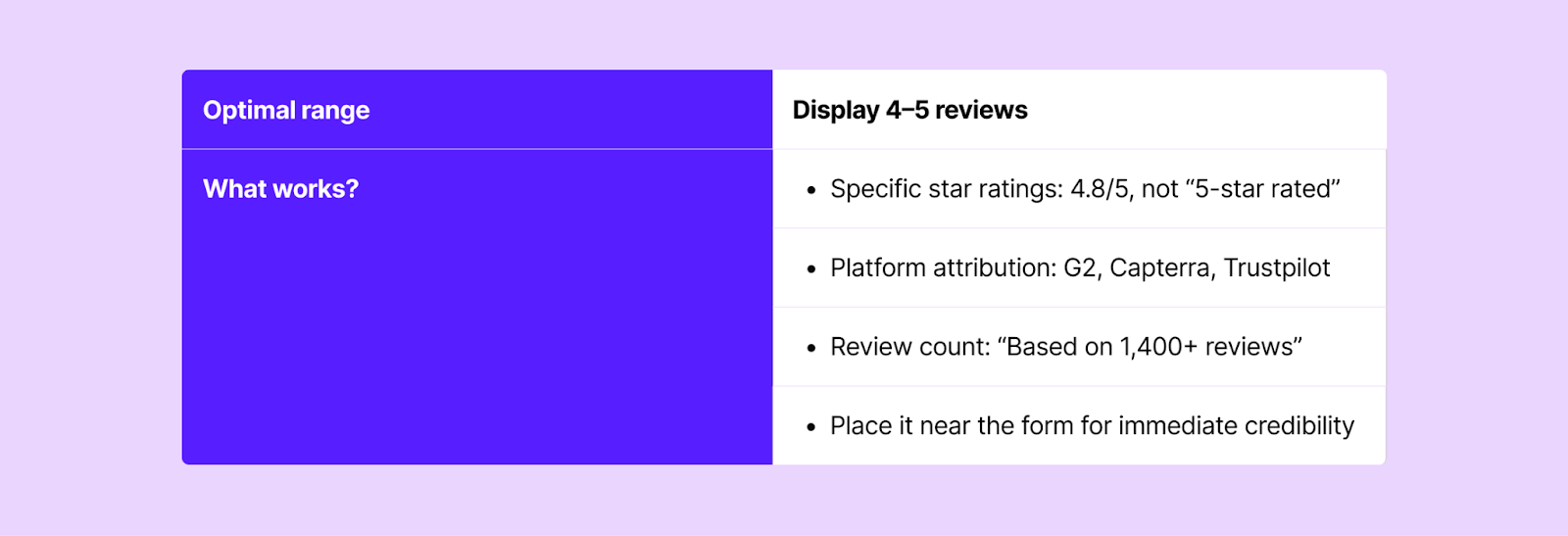
Customer reviews
Trust badges

Testimonials
Aspect III: CTA Language that converts
CTA Text
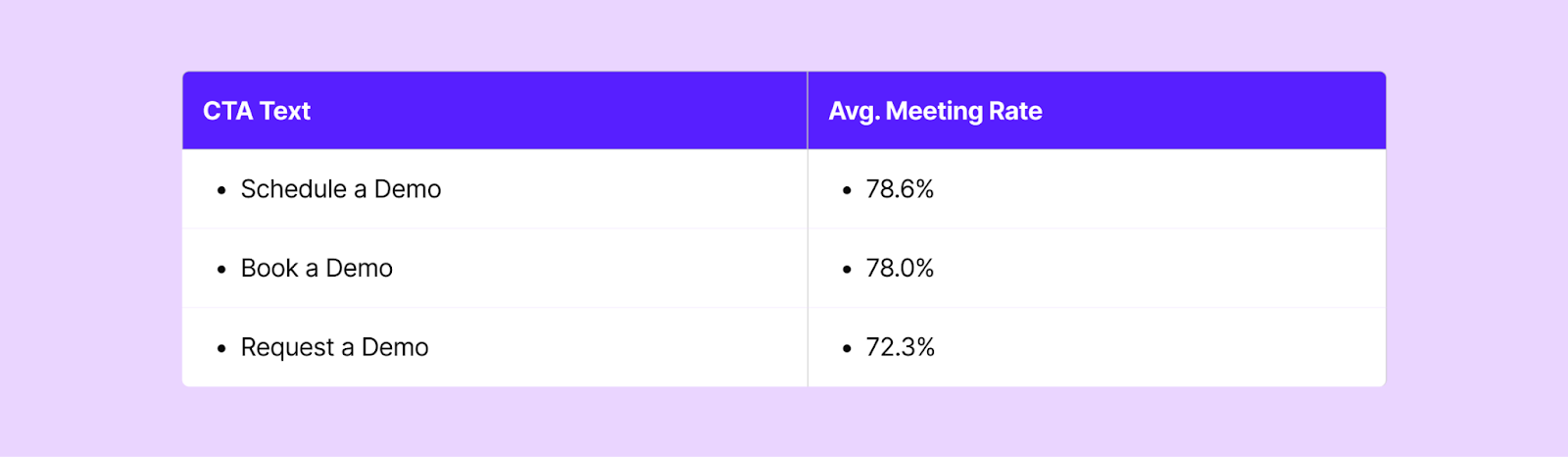
“Book” or “Schedule” beats “Request”.
The psychology is quite simple: “request” implies uncertainty, like you’re asking permission. “Book” or “Schedule” signals certainty, giving a clear picture to the user: you book a demo, choose a time slot, and your meeting is scheduled.
On average, using “book” or “schedule” in the CTA improves your meeting rates by 5–6%.
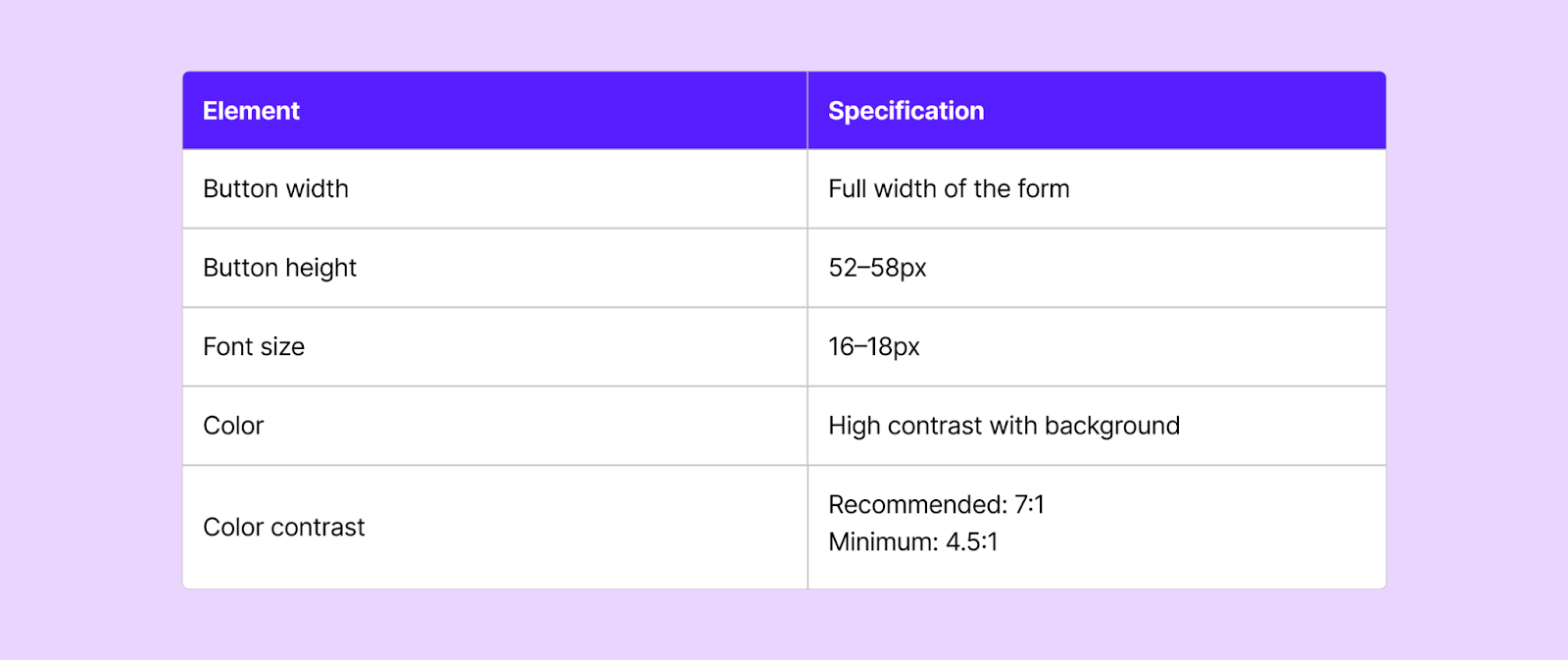
CTA Button Design
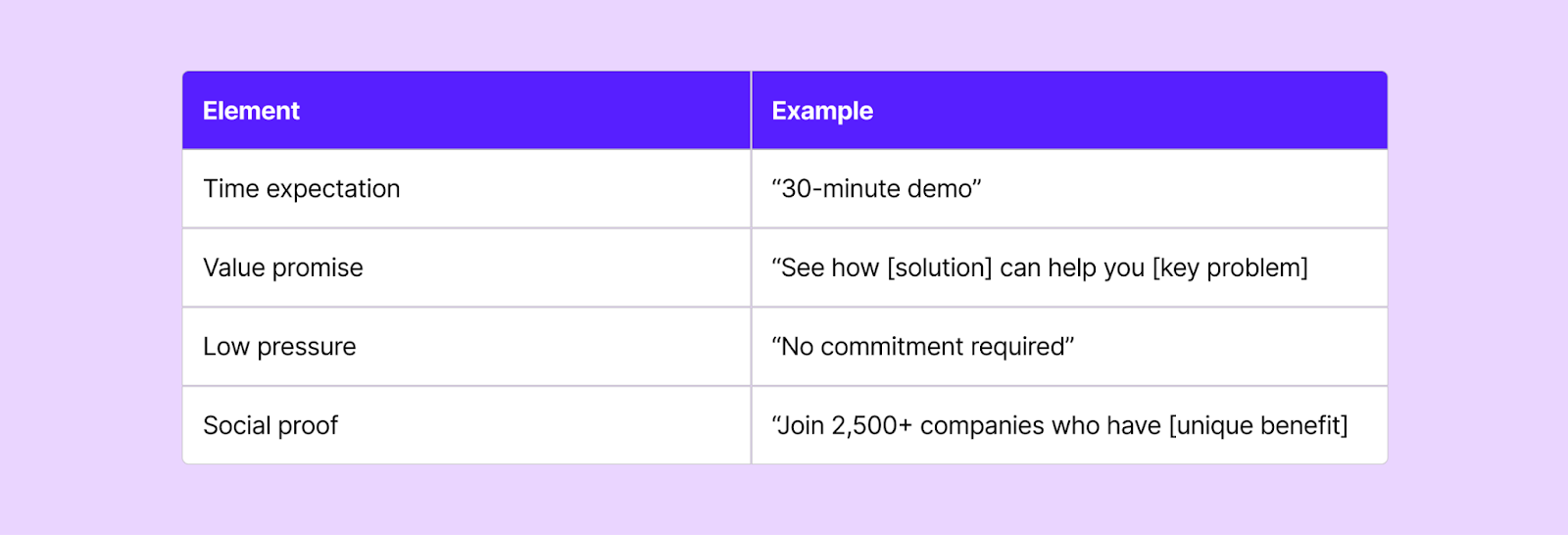
Aspect IV: Supporting CTA Messaging
Don’t just stop with “Book a Demo”. Include other benefits that they’ll be getting with the demo:
Part III: Technical Aspects
Aspect I: Tech Stack
HubSpot Forms + RevenueHero is the winning combination (75% of the top performers). Here’s why:
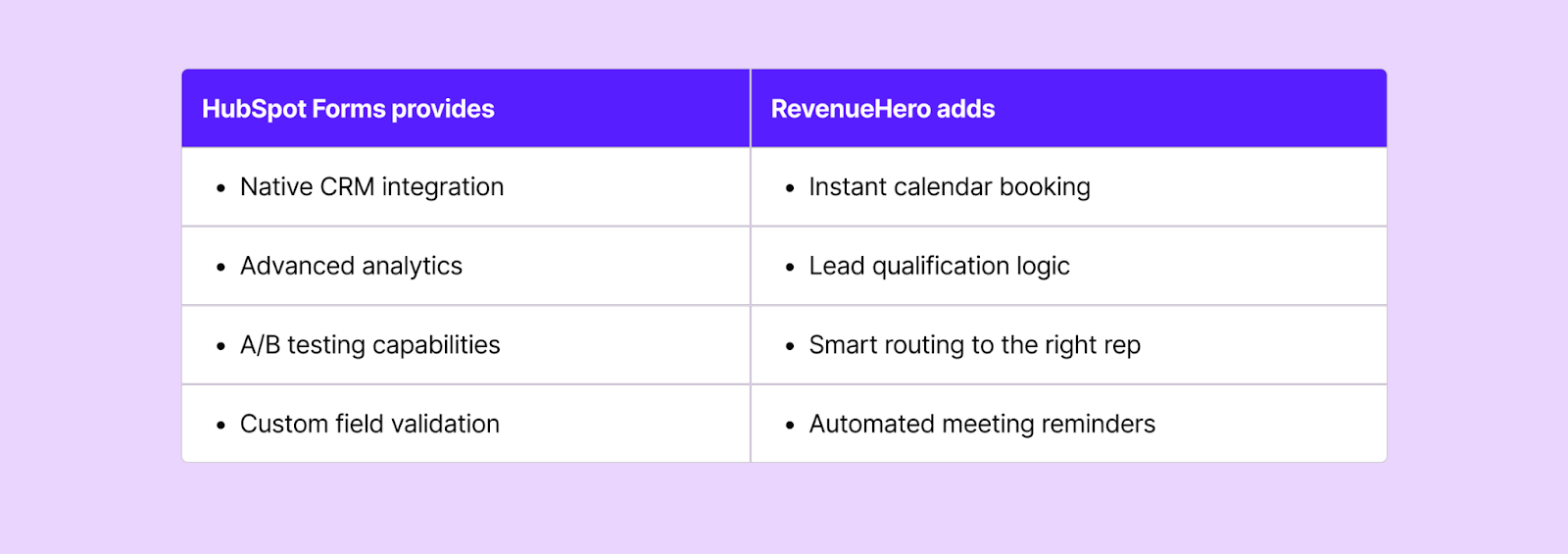
Here’s how it works in practice:
Prospect fills out the form → RevenueHero instantly qualifies the lead → Leads see calendar selection immediately → Meeting is booked and synced to rep’s calendar
No email tennis. No calendar tetris. Just instant gratification.
Pro-tip: Whatever form provider you choose, pair it with a scheduling layer that enables instant booking.
Aspect II: Page performance
Slow pages obliterate conversions. Every second delayed costs you 7% in conversions:
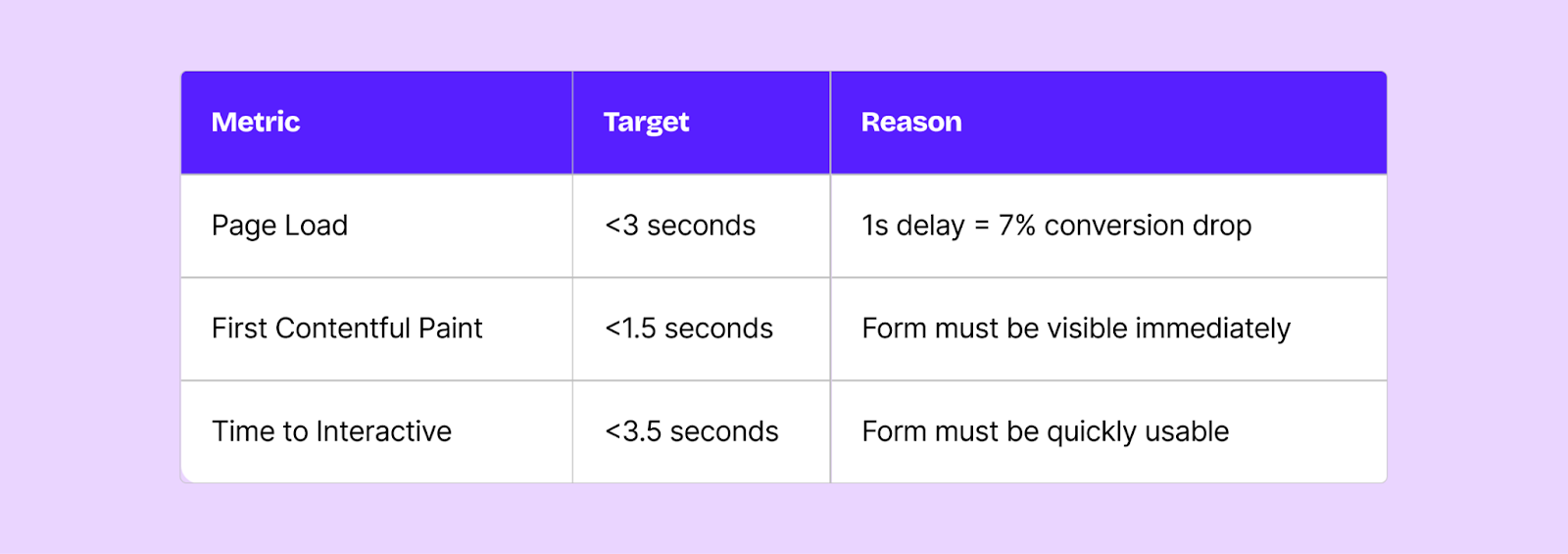
To hit these targets:
- Optimize and compress images
- Use a CDN for faster content delivery
- Minimize JavaScript
- Enable browser caching
Aspect III: UTM Parameter Tracking
You can't optimize what you can't measure. Capture attribution data automatically so you know which channels drive your best demos.
Essential parameters to track:
- utm_source
- utm_medium
- utm_campaign
- utm_term
- utm_content
- gclid (Google Ads)
- fbclid (Facebook)
- li_fat_id (LinkedIn)
Pro tip: Store these in hidden form fields. This way, you can connect demo requests back to the campaigns that drove them and calculate true channel ROI.
Aspect IV: Email Validation Tools
Implement email validation to catch typos, identify fake emails, and improve data quality before leads hit your CRM. Tools like Zerobounce, Clearout.io, pay for themselves by eliminating bad data and ensuring your sales team only works with qualified leads.
High-performing Demo Page Template
Do’s and Don’ts for Marketers
Start With Your Baseline
Before making any changes, establish your current performance by creating a baseline. Track the following metrics:
- Total demo page visits
- Form submissions
- Form-to-demo conversion rate (submissions → scheduled meetings)
- Show rate (scheduled → attended)
- Source/channel breakdown
- Mobile vs desktop performance
Align With Sales Before Launching
Before going live with the changes, meet with the sales leadership to:
- Review the information reps actually use to personalize demos.
- Align on lead routing logic
- Set expectations for lead quality vs. quantity
- Establish feedback loop for ongoing optimization
Set the goal as qualified meetings that show up, not just form fills.
Set Up Proper Attribution Tracking
- Use UTM parameters consistently across all channels
- Store these in hidden form fields so you can connect demo requests to the campaigns that drove them
- Find out which channels drive the highest form-to-demo conversion rates
Build a Testing Culture
Perform A/B tests with one element at a time:
- CTA copy variations (“book” vs. “schedule”)
- Form field & dropdown count
- Headline messaging (benefit-focused vs. problem-focused)
- Social proof placement (above vs. below form)
Run tests and document everything: hypothesis, results, and learnings. You’ll develop a keen eye on what works and what doesn’t.
Coordinate With Your Content Strategy
Your demo page doesn’t exist in isolation. It’s the conversion point for your entire content engine: blog posts, case studies, email nurture sequences, paid ads and landing pages, etc.
Make sure your message is consistent. If your ads promise a “30-day result” but your demo page doesn’t mention timelines, you’ve created disconnect.
Calculate Your Demo Page ROI
Brace yourself, because here comes a lot of math (to show the business impact of optimizing your demo pages):
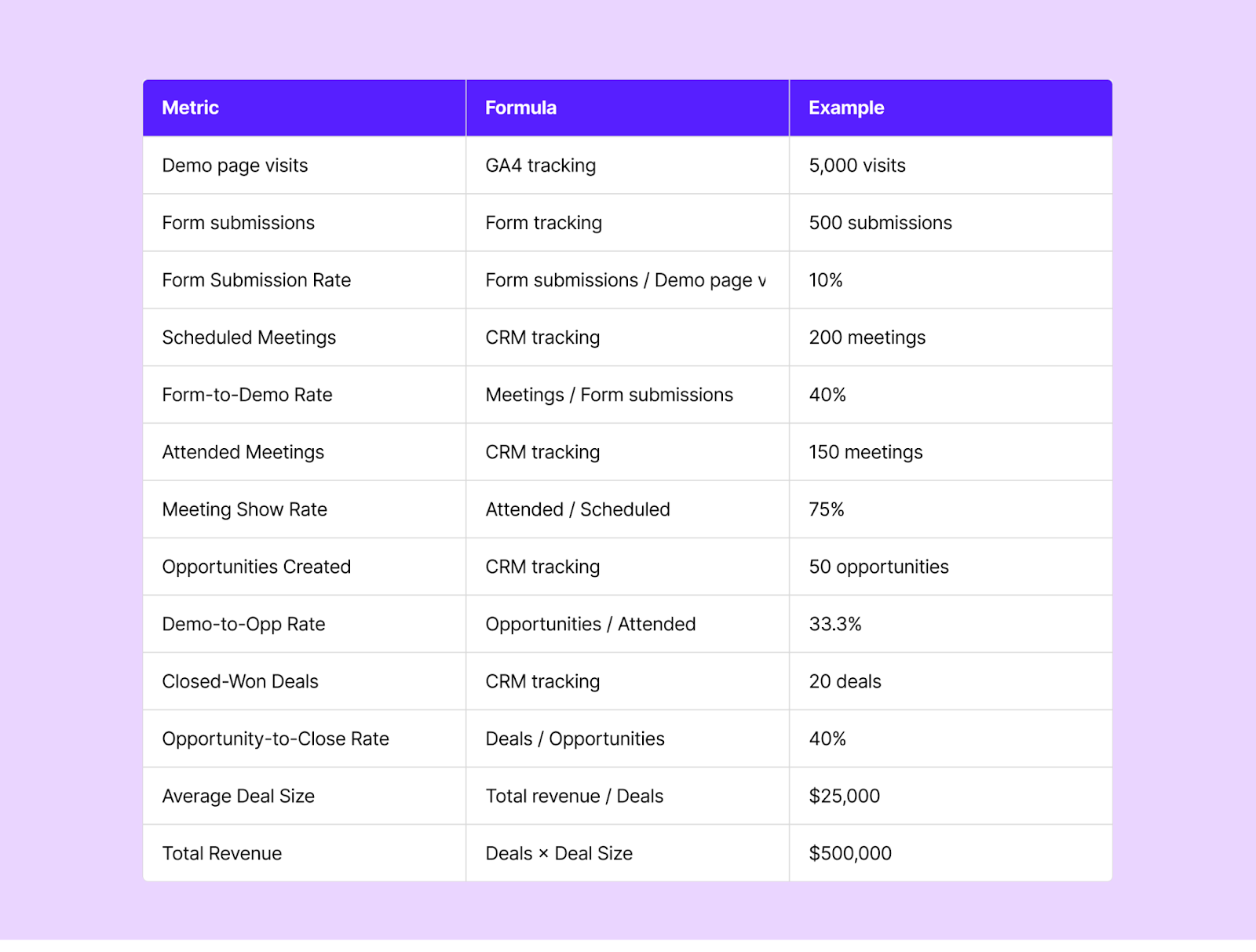
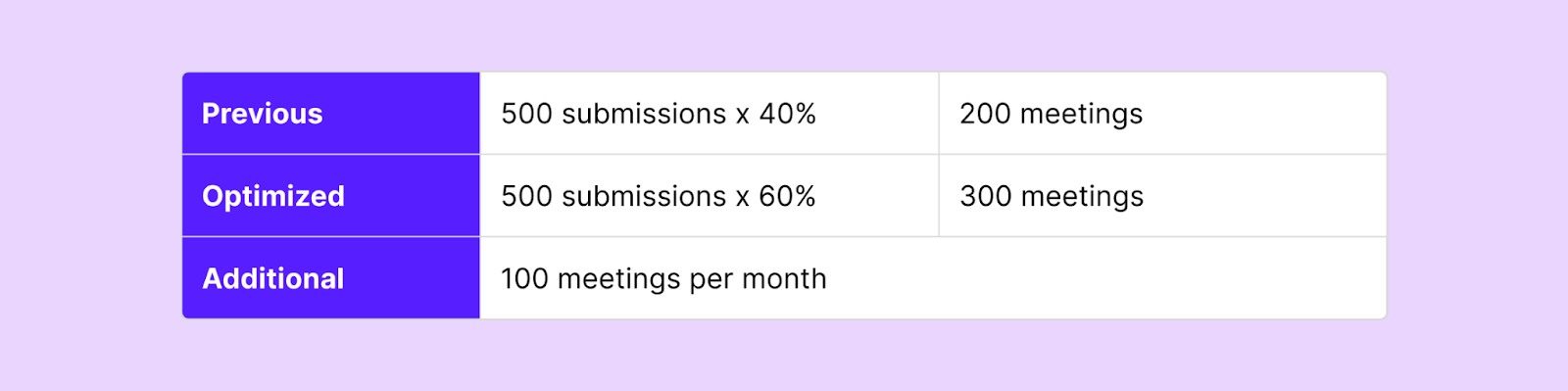
Now calculate the impact of optimization:
If you improve your form-to-demo rate from 40% to 60%, with everything else constant:
Following the funnel math:
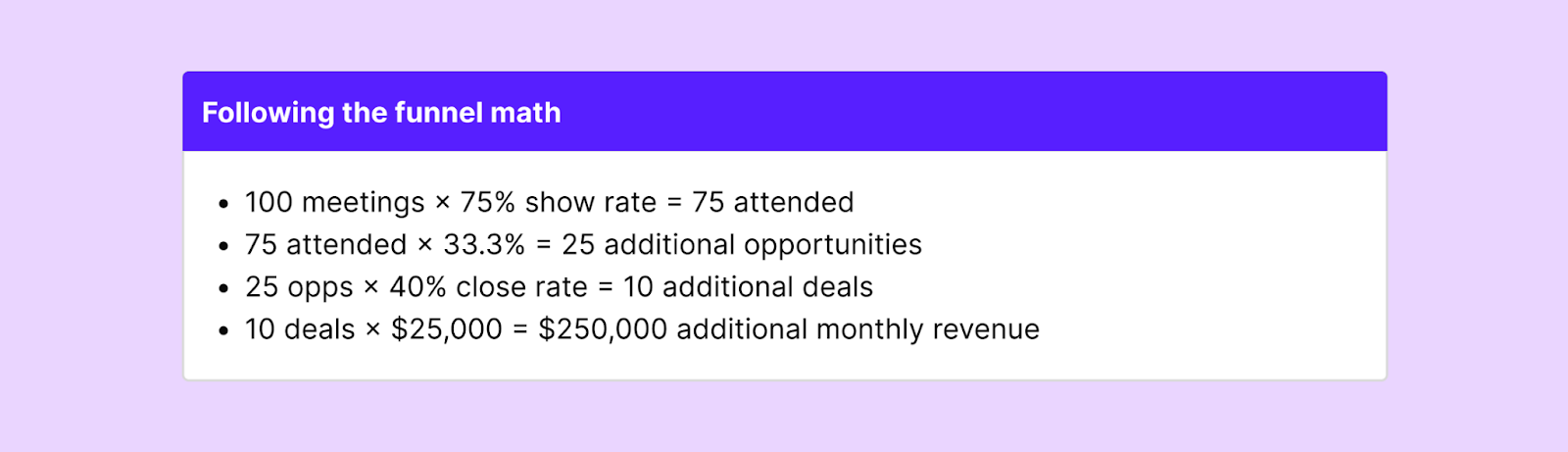
That's $3M in additional annual revenue from a 20-point improvement in one metric.
You can present this match to leadership quarterly—positioning yourself as a revenue driver, not a cost center.
Follow Industry Benchmarks
Use your industry’s benchmarks as directional guidance:
- If you're below average, you likely have fundamental issues with your demo page that need addressing—form design, social proof, technical problems.
- If you're average to above-average, focus on incremental optimization through testing and refinement.
- If you're top-performing, focus on scaling what's working and helping other marketing initiatives (e.g., optimizing top-of-funnel to drive more qualified traffic to your high-converting page).
Your 90-Day Optimization Plan
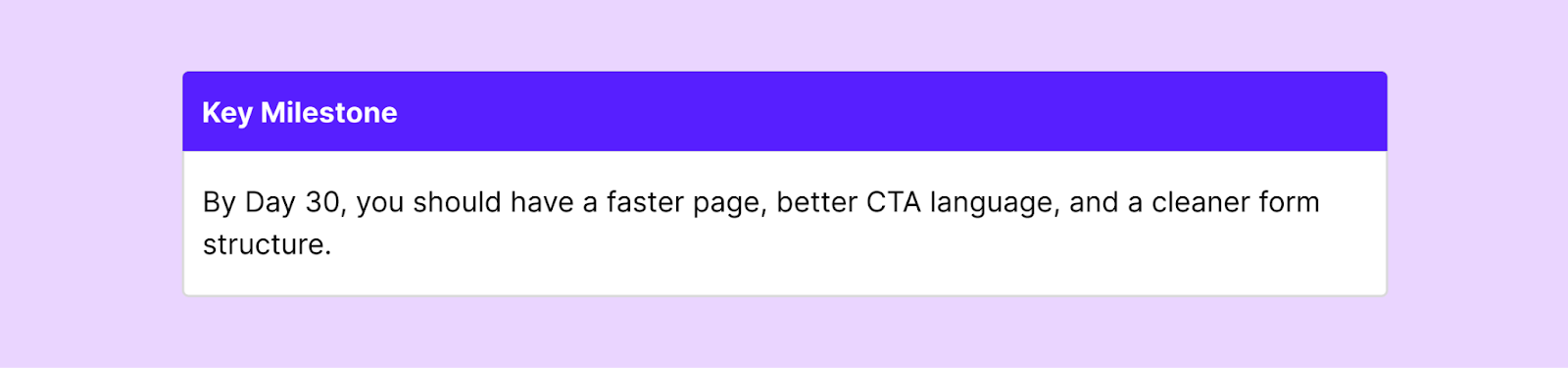
Days 1-30: Foundation & Quick Wins
Audit & Baseline
- Document current performance metrics
- Analyze form fields and compare to benchmarks
- Review social proof elements
- Test page speed and mobile experience
- Interview your sales team about lead quality
High-Impact Quick Wins
- Change CTA from "Request" to "Book a Demo"
- Ensure form is above the fold on all devices
- Add 4 trust badges near form
- Optimize page load speed (compress images, enable CDN)
Form Optimization Begins
- Split "Full Name" into First + Last Name fields
- Audit form fields—remove unnecessary ones
- Optimize to 6-9 fields with 2 dropdowns
- Add "How did you hear about us?" for attribution
Days 31-60: Social Proof & Scheduling
Instant Scheduling Implementation
- Implement an instant scheduling tool like RevenueHero
- Set up proper lead routing logic
- Configure automated meeting reminders
- Test the complete booking flow
Social Proof Enhancement
- Display 6–12 customer logos in the trust bar
- Add 5 customer reviews with ratings
- Create 5 testimonials with photos and specific metrics
- Build a "What to Expect" section
- Consider adding 1 video testimonial
Technical Tracking Setup
- Set up UTM parameter tracking in hidden fields
- Configure conversion tracking dashboard
- Implement email validation tools (ZeroBounce or Clearout)
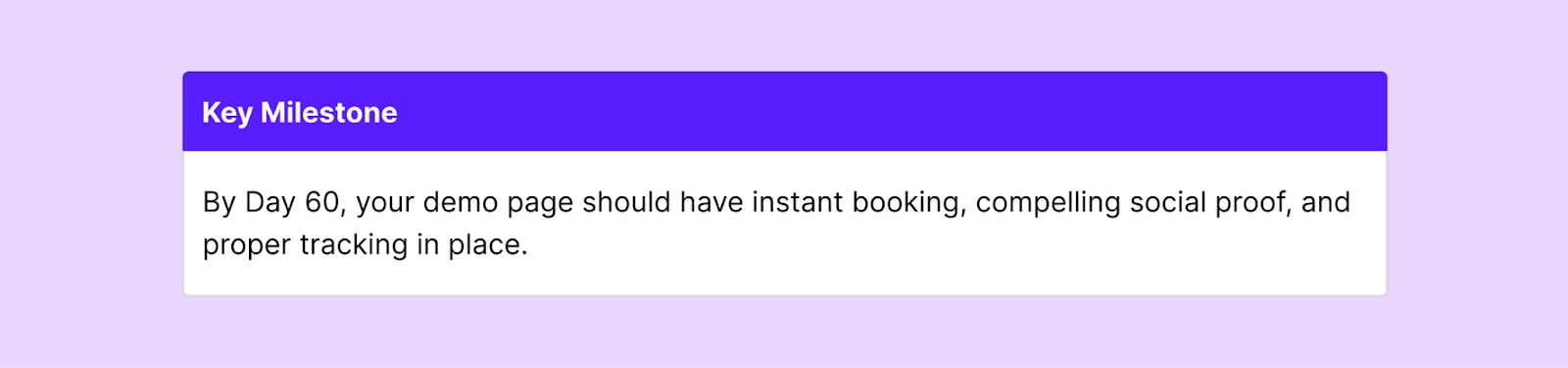
Days 61-90: Design, Testing & Optimization
Design & Layout Overhaul
- Implement two-column hero layout
- Optimize mobile experience completely
- Add secondary CTA below testimonials
- Ensure all elements are mobile-responsive
A/B Testing Launch
- Launch first A/B test
- Test different headline variations
- Monitor results and gather data
Analysis & Documentation
- Analyze results from all changes
- Calculate ROI and improvement in conversion rates
- Document learnings in internal playbook
- Present results to leadership
- Identify next round of tests
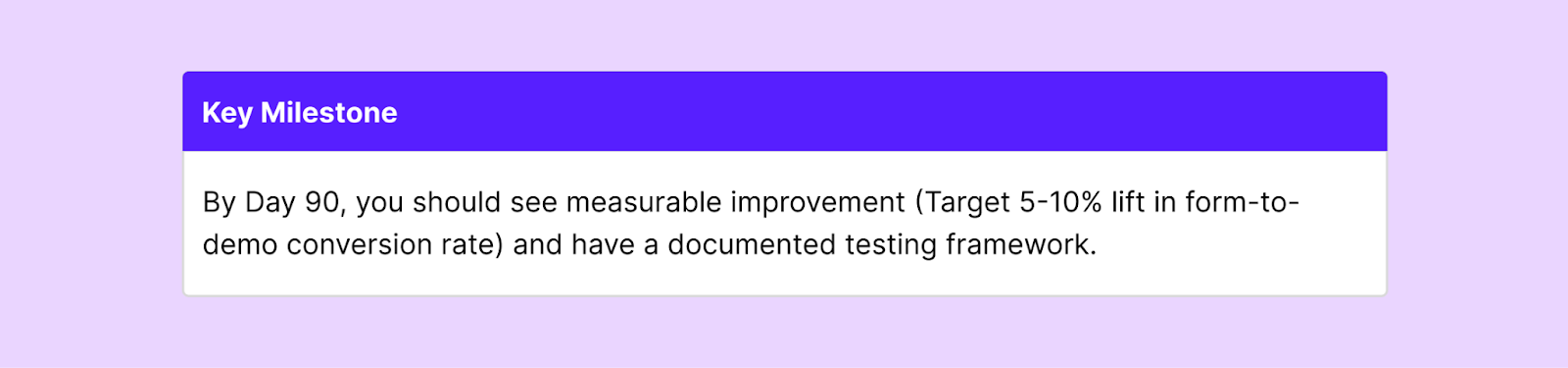
Day 91 Onwards: Continuous Optimization
Monthly Reviews:
- Analyze conversion rates by traffic source
- Review A/B test results
- Identify underperforming elements
- Gather sales team feedback on lead quality
Quarterly Deep Dives:
- Compare performance to industry benchmarks
- Audit all form fields and social proof elements
- Test new layout variations
- Update testimonials and case studies with fresh content
Stay Updated:
- Monitor competitor demo pages quarterly
- Review industry conversion benchmarks
- Test emerging technologies (new scheduling tools, AI personalization)
- Iterate based on evolving customer preferences
The Bottom Line
You now have the blueprint that high-performing demo pages use to convert 70%+ of their form fills into meetings.
But you don’t need to implement everything all at once. Start with the highest impact changes:
- Split your name field into First + Last Name
- Change "Request" to "Book a Demo"
- Add 4 trust badges near your form
- Implement instant scheduling
Remember: a 5% improvement in form-to-demo conversion rates brings in 25 additional sales conversations for a company that gets 500 monthly demo requests.
Turn your demo page into a revenue driver, not just yet another marketing asset.
Let RevenueHero help your team turn high-intent users into booked meeting without slowing down your funnel.